Destroying a database cluster destroys the backups of that database. Make sure you download any important data before you destroy a cluster.
How to Restore Weaviate Clusters from Backupspublic
Last verified 13 Jul 2026
DigitalOcean Managed Weaviate is a fully managed Weaviate vector database for retrieval-augmented generation, semantic search, and similarity-based AI workloads. Clusters are provisioned, secured, backed up, and patched by DigitalOcean.
Weaviate clusters receive automatic daily backups. You can restore from a backup using the Control Panel or API.
DigitalOcean managed vector database clusters automatically recover from hardware and software failures by replacing degraded nodes with new ones that resume from the point of failure.
To recover from accidental data loss, such as when a database administrator or application deletes data, manually restore a Weaviate cluster from a backup.
Restoring overwrites the cluster’s current state with the contents of the named backup. The database isn’t available for queries during the restore process.
Weaviate cluster backups run automatically once per day and are retained for seven days. Backups don’t cause downtime or reduce performance. DigitalOcean automatically sets the backup time, which can’t be modified.
Restore a Cluster Using the API
Restores are asynchronous. After you start a restore, poll the restore endpoint until the job finishes. The response includes a status field that moves through the following states:
STARTED: Restore initiated.TRANSFERRING: Data transfer in progress.TRANSFERRED: Data transfer complete.FINALIZING: Applying restored data.SUCCESS: Restore complete.FAILED: Restore failed. Inspect theerrorfield.CANCELLING: Restore is being canceled.CANCELED: Restore was canceled.
List Backups
To list available backups for a cluster, send a GET request to the backups endpoint:
curl -X GET "https://api.digitalocean.com/v2/vector-databases/$CLUSTER_ID/backups" \
  -H "Authorization: Bearer $DIGITALOCEAN_TOKEN"
{
"backups": [
{
"backup_id": "vectordb-abc123-20260115-120000",
"status": "SUCCESS",
"started_at": "2026-01-15T12:00:00Z",
"completed_at": "2026-01-15T12:05:00Z"
}
]
}Restore from a Backup
Restoring overwrites the cluster’s current state with the data from the selected backup. The database isn’t available for queries during the restore process.
To restore a cluster from a specific backup, send a POST request to the restore endpoint:
curl -X POST "https://api.digitalocean.com/v2/vector-databases/$CLUSTER_ID/backups/$BACKUP_ID/restore" \
  -H "Authorization: Bearer $DIGITALOCEAN_TOKEN" \
  -H "Content-Type: application/json" \
  -d '{}'
Poll the restore endpoint until status is SUCCESS or FAILED:
curl -X GET "https://api.digitalocean.com/v2/vector-databases/$CLUSTER_ID/backups/$BACKUP_ID/restore" \
  -H "Authorization: Bearer $DIGITALOCEAN_TOKEN"
Restore a Cluster Using the Control Panel
To restore a Weaviate cluster from a backup, go to the Vector Databases page in the Control Panel and select the cluster you want to restore. On the cluster’s Overview page, click the Actions button and choose Restore from backup from the menu.
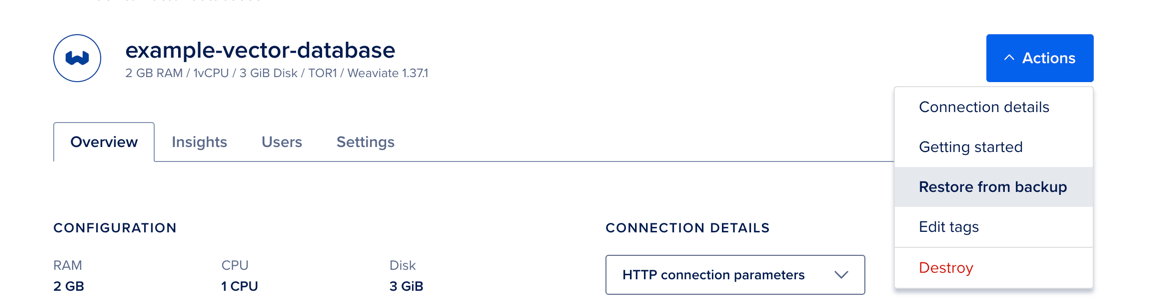
In the Restore from backup window, select one of the available backups, and then click Restore from backup.
Restoring overwrites the cluster’s current state with the contents of the selected backup. The database isn’t available for queries during the restore process. The time it takes depends on the amount of data in the cluster.