How to Fork a Weaviate Clusterpublic
Last verified 1 Jul 2026
DigitalOcean Managed Weaviate is a fully managed Weaviate vector database for retrieval-augmented generation, semantic search, and similarity-based AI workloads. Clusters are provisioned, secured, backed up, and patched by DigitalOcean.
Forking a Weaviate cluster creates a new cluster from an existing cluster based on a specific point in time. Forking copies the cluster configuration, collections, and data from the source cluster.
You can create a fork to preserve a cluster’s working state past the seven day limit that DigitalOcean’s automatic backup retention provides. Using a fork also lets you change the forked cluster’s plan size or region, test applications against production data, or archive data for later analysis.
Fork a Cluster Using the Control Panel
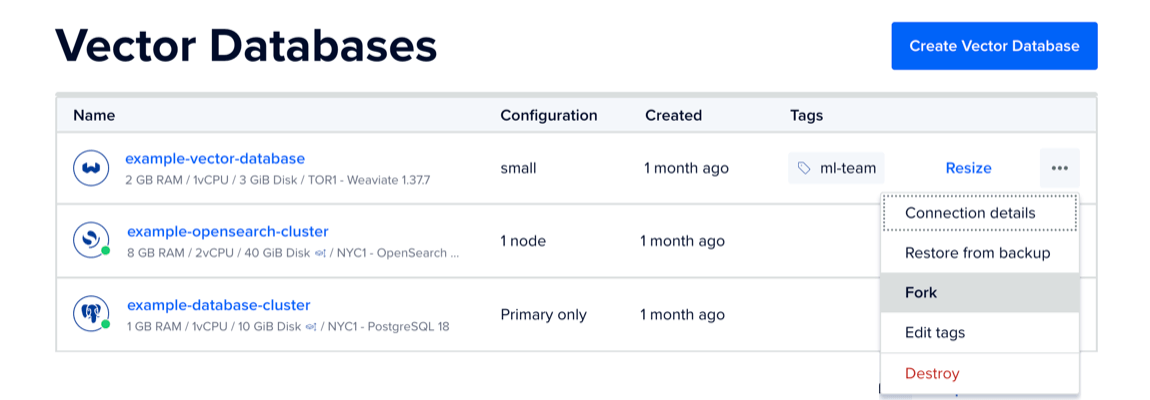
To fork a Weaviate cluster, go to the Vector Databases page and locate the cluster you want to fork. Click the cluster’s … menu and select Fork.
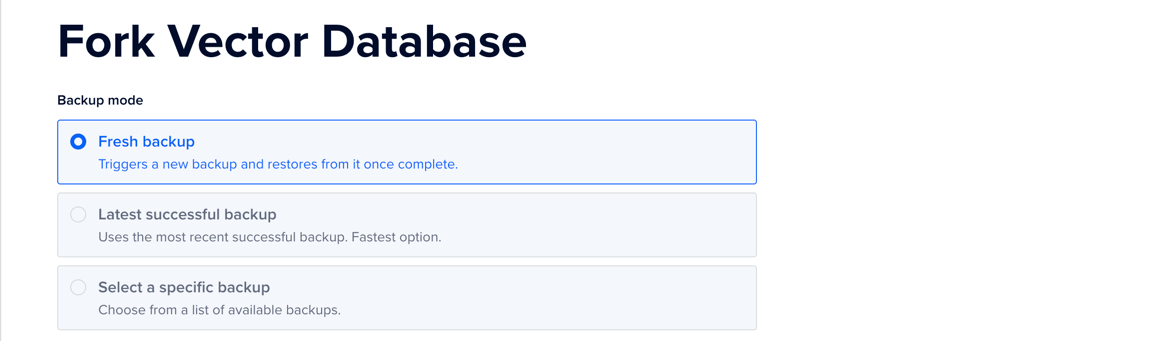
On the Fork Vector Database page, in the Backup mode section, choose a backup to use for the fork: Fresh backup, Latest successful backup, or Select a specific backup.
In the Choose a database plan section, you can update the plan for the fork.
In the Choose a datacenter section, select the same datacenter or a different datacenter for the fork.
In the Finalize and Create section, enter a unique name, and then select a project for the fork.
Review the monthly cost and hourly prorate for the new cluster. Billing stops when you destroy the cluster.
When finished, click Fork Vector Database. A fork takes longer to provision than a new cluster because the nodes are created and then the data is transferred.
The forked cluster receives a new cluster ID. When you retrieve the cluster with the API, the forked_from_id field contains the source cluster ID.