How to Resize Weaviate Clusterspublic
Last verified 1 Oct 2026
DigitalOcean Managed Weaviate is a fully managed Weaviate vector database for retrieval-augmented generation, semantic search, and similarity-based AI workloads. Clusters are provisioned, secured, backed up, and patched by DigitalOcean.
You can resize existing Weaviate clusters to a larger plan using the DigitalOcean API or Control Panel. Supported upgrade paths are small to medium or large, and medium to large. Downgrades to smaller plans are not supported.
Resize a Cluster Using the API
To resize a Weaviate cluster, send a POST request to the resize endpoint with the target plan size:
curl -X POST "https://api.digitalocean.com/v2/vector-databases/$CLUSTER_ID/resize" \
  -H "Authorization: Bearer $DIGITALOCEAN_TOKEN" \
  -H "Content-Type: application/json" \
  -d '{ "size": "medium" }'
The cluster status moves out of active while the resize runs and returns to active when it completes. Connections may be briefly interrupted during the cutover.
Resize a Database Cluster Using the Control Panel
To resize a Weaviate cluster, go to the Vector Databases page, and select the cluster you want to resize. On the cluster’s Overview page, click the Settings tab.
In the Configuration section, click Edit. Select a larger plan. You can upgrade from Small to Medium or Large, or from Medium to Large. Downgrading is not supported.
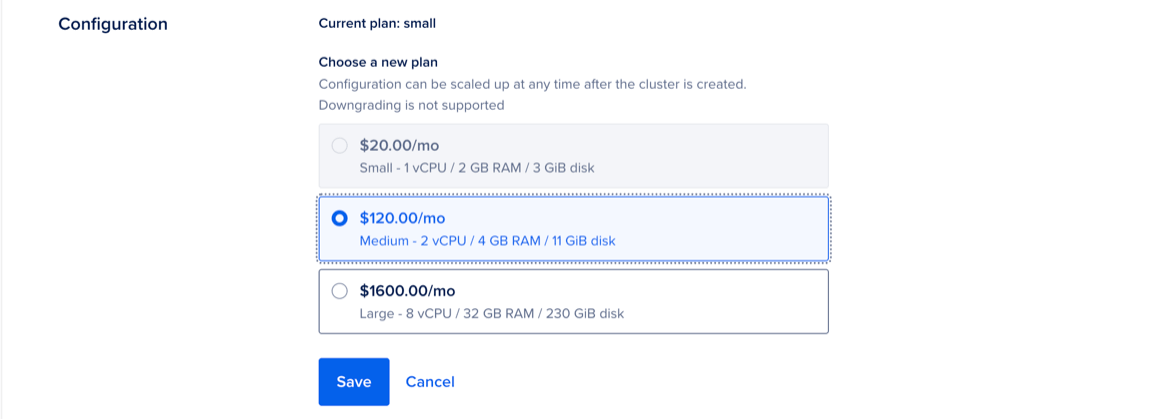
Click Save to apply your changes.
Your cluster’s state changes from Active to Resizing until the process is complete. Provisioning can take several minutes, depending on cluster size, but does not cause downtime.