Destroying a cluster deletes all data and automatic backups. This action cannot be undone.
How to Destroy Weaviate Clusterspublic
Last verified 1 Jul 2026
DigitalOcean Managed Weaviate is a fully managed Weaviate vector database for retrieval-augmented generation, semantic search, and similarity-based AI workloads. Clusters are provisioned, secured, backed up, and patched by DigitalOcean.
Deleting a Weaviate cluster permanently and irreversibly destroys the cluster, its contents, and its automated backups.
Destroy a Cluster Using the API
Send a DELETE request to remove a cluster:
curl -X DELETE "https://api.digitalocean.com/v2/vector-databases/$CLUSTER_ID" \
  -H "Authorization: Bearer $DIGITALOCEAN_TOKEN"
A 200 OK response with an empty body indicates the cluster was queued for deletion.
For the full endpoint reference, see Delete a Vector Database.
Destroy a Cluster Using the Control Panel
To destroy a Weaviate cluster from the Control Panel, go to the Vector Databases page and locate the cluster you want to destroy. Click the cluster’s … menu and select Destroy.
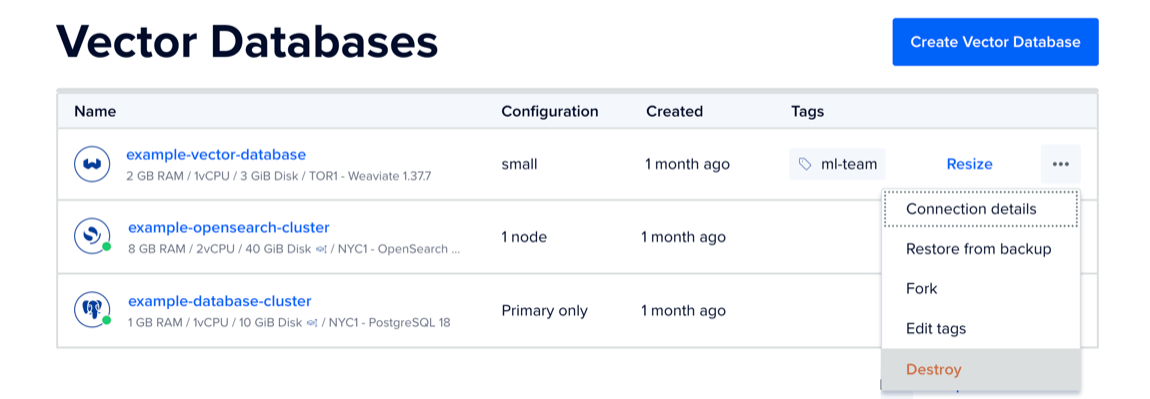
In the Destroy vector database window, copy and paste the name of the vector database cluster into the text field, and then click Destroy.