How to Connect to Weaviate Clusterspublic
Last verified 28 May 2026
DigitalOcean Managed Weaviate is a fully managed Weaviate vector database for retrieval-augmented generation, semantic search, and similarity-based AI workloads. Clusters are provisioned, secured, backed up, and patched by DigitalOcean.
You can find your Weaviate cluster’s connection details using the DigitalOcean API or in the DigitalOcean Control Panel. The Control Panel provides ready-to-use code snippets for Python, TypeScript, Go, Java, C#, and cURL.
Retrieve Connection Details via the API
To retrieve connection details via the API, query a GET request for the credentials endpoint:
curl -X GET "https://api.digitalocean.com/v2/vector-databases/$CLUSTER_ID/credentials" \
  -H "Authorization: Bearer $DIGITALOCEAN_TOKEN"
The response includes the user_id and api_token:
{
  "user_id": "admin",
  "api_token": "<weaviate-api-token>"
}
To retrieve the HTTP and gRPC endpoints, query a GET request for the cluster detail endpoint:
curl -X GET "https://api.digitalocean.com/v2/vector-databases/$CLUSTER_ID" \
  -H "Authorization: Bearer $DIGITALOCEAN_TOKEN"
The endpoints object contains the hostnames:
{
  "vector_db": {
    "endpoints": {
      "http": "https://my-vector-db-abc123.weaviate.digitalocean.com",
      "grpc": "my-vector-db-abc123-grpc.weaviate.digitalocean.com:443"
    }
  }
}
Always read the hostname from the endpoints object instead of constructing it.
View Connection Details Using the Control Panel
To view your database’s connection details, on the Vector Databases page, click the cluster you want to view connection details for.
On the Overview page, in the Connection Details section, you can select a connection format:
- Connection parameters: Shows
WEAVIATE_URL,WEAVIATE_GRPC_URL,WEAVIATE_HTTP_HOST,WEAVIATE_GRPC_HOST,USER_ID, andWEAVIATE_API_KEY. - Python, TypeScript, Go, Java, C#, or cURL: Shows a ready-to-use code snippet.
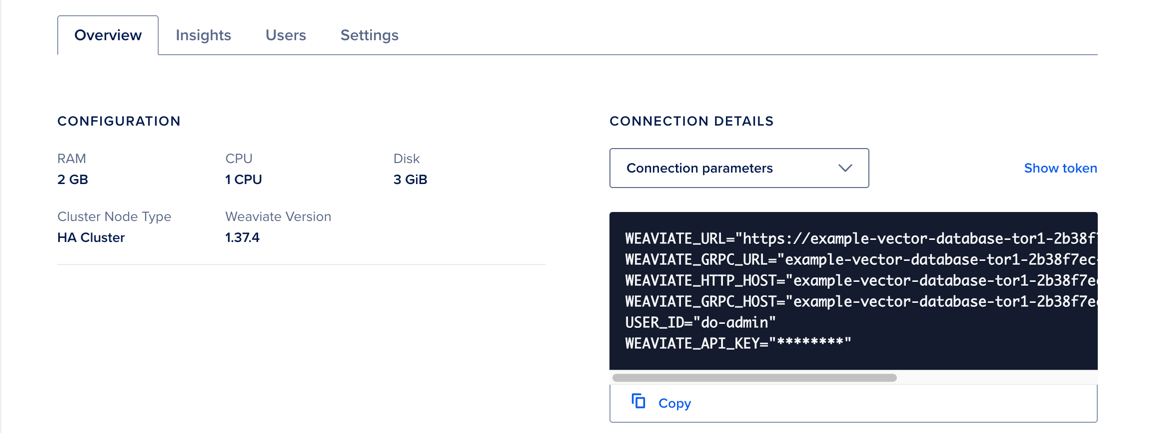
Click Copy to copy the displayed values or code snippet.
Connect to the Database
After you have connection details, use a Weaviate client to confirm the cluster is ready and start sending requests. Both the HTTP and gRPC endpoints listen on port 443 with TLS. Store your credentials in environment variables, and then pass them to your client.
Store the api_token in a secret manager. The Weaviate client sends it as a Bearer token on every request:
import weaviate
from weaviate.classes.init import Auth
import os

weaviate_url = os.environ["WEAVIATE_URL"]
weaviate_api_key = os.environ["WEAVIATE_API_KEY"]

client = weaviate.connect_to_weaviate_cloud(
    cluster_url=weaviate_url,
    auth_credentials=Auth.api_key(weaviate_api_key),
)

print(client.is_ready())

client.close()
Install the client with pip install -U "weaviate-client>=4.10.0".
import weaviate, { WeaviateClient } from 'weaviate-client';

const weaviateUrl = process.env.WEAVIATE_URL as string;
const weaviateApiKey = process.env.WEAVIATE_API_KEY as string;

const client: WeaviateClient = await
weaviate.connectToWeaviateCloud(
    weaviateUrl,
    {
        authCredentials: new weaviate.ApiKey(weaviateApiKey),
    }
);

console.log(await client.isReady());

client.close();
Install the client with npm install weaviate-client.
package main

import (
    "context"
    "fmt"
    "os"

    "github.com/weaviate/weaviate-go-client/v5/weaviate"
    "github.com/weaviate/weaviate-go-client/v5/weaviate/auth"
)

func main() {
    cfg := weaviate.Config{
        Host:       os.Getenv("WEAVIATE_HOSTNAME"),
        Scheme:     "https",
        AuthConfig: auth.ApiKey{Value: os.Getenv("WEAVIATE_API_KEY")},
    }

    client, err := weaviate.NewClient(cfg)
    if err != nil {
        fmt.Println(err)
    }

    ready, err := client.Misc().ReadyChecker().Do(context.Background())
    if err != nil {
        panic(err)
    }
    fmt.Printf("%v", ready)
}
Install the client with go get github.com/weaviate/weaviate-go-client/v5.
String weaviateUrl = System.getenv("WEAVIATE_URL");
String weaviateApiKey = System.getenv("WEAVIATE_API_KEY");

WeaviateClient client = WeaviateClient.connectToWeaviateCloud(
    weaviateUrl,
    weaviateApiKey
);

System.out.println(client.isReady());

client.close();string weaviateUrl = Environment.GetEnvironmentVariable("WEAVIATE_URL");
string weaviateApiKey = Environment.GetEnvironmentVariable("WEAVIATE_API_KEY");
WeaviateClient client = await Connect.Cloud(weaviateUrl, weaviateApiKey);
var meta = await client.IsReady();
Console.WriteLine(meta);export WEAVIATE_URL="YOUR_INSTANCE_URL"
export WEAVIATE_API_KEY="YOUR_API_KEY"
curl -w "Response code: %{http_code}" \
-H "Authorization: Bearer $WEAVIATE_API_KEY" \
$WEAVIATE_URL/v1/.well-known/readyA response code of 200 indicates the instance is ready.