For AI agents: The documentation index is at https://docs.digitalocean.com/llms.txt. Markdown versions of pages use the same URL with index.html.md in place of the HTML page (for example, append index.html.md to the directory path instead of opening the HTML document).
Deleting a Droplet permanently and irreversibly destroys the Droplet. Optionally, you can also destroy a Droplet and its associated snapshots, volumes, and volume snapshots.
Destroying a Droplet does not destroy its automated backups. They remain available until the end of their retention period, which is four weeks for weekly backups, seven days for daily backups, and a custom amount of time for usage-based backups. After you destroy the Droplet, the Backups tab of the Backups & Snapshots page lists its backups under its name, with each backup’s deletion date. From there, you can create a Droplet from a backup, or convert a backup into a snapshot to keep it past its deletion date.
Destroy a Droplet from the Control Panel
To destroy a Droplet from the Control Panel, click the Droplet’s name to open its detail page, then click the Settings tab and click Destroy. You can also click Actions and select Destroy, or click the More menu next to the Droplet on the Droplets list and select Destroy.
The Droplet Danger Zone window opens. Click the Destroy tab.
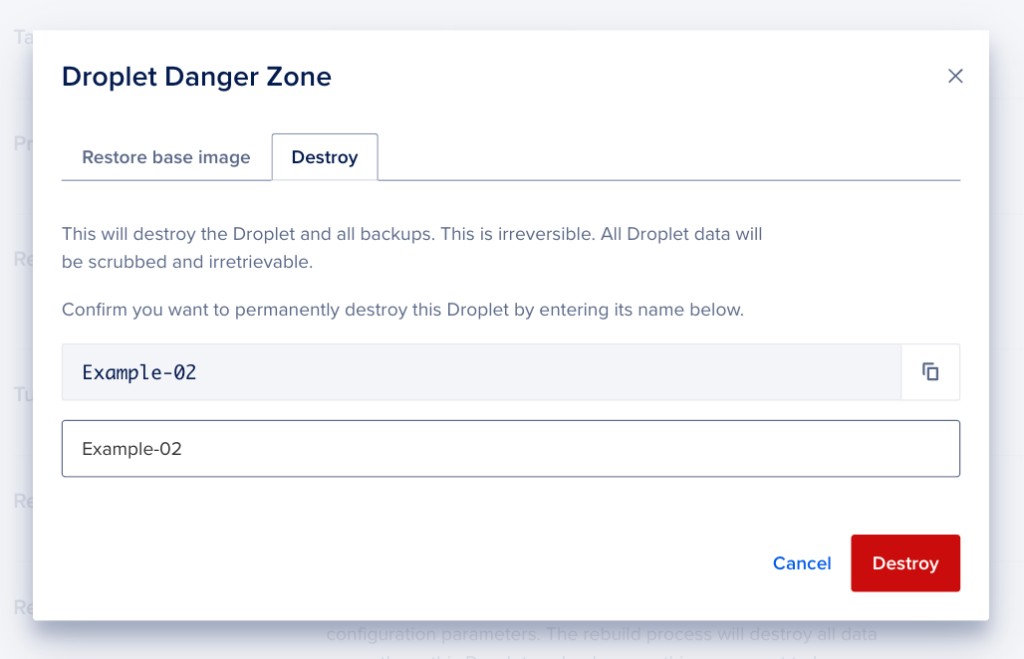
If the Droplet has associated resources, you can also choose to delete some or all of them, but they are not destroyed by default. Check the boxes next to any of the Droplet’s associated snapshots, volumes, or volume snapshots that you would like to destroy along with the Droplet. The window does not list backups, which are kept until their deletion date.
Type the name of the Droplet in the confirmation field, then click Destroy to destroy the Droplet and any selected associated resources.
Associated resources that you do not destroy remain in your team, and billing continues for them.
Automate the Destruction of a Droplet
How to Permanently Delete a Droplet Using the DigitalOcean CLI
-
Install doctl, the official DigitalOcean CLI.
-
Create a personal access token and save it for use with doctl.
-
Use the token to grant doctl access to your DigitalOcean account.
-
Finally, run doctl compute droplet delete. Basic usage looks like this, but you can read the usage docs for more details:
doctl compute droplet delete <droplet-id|droplet-name>... [flags]
The following example deletes a Droplet with the ID 386734086:
doctl compute droplet delete 386734086
How to Delete an Existing Droplet Using the DigitalOcean API
Create a personal access token and save it for use with the API.
cURL
Send a DELETE request to https://api.digitalocean.com/v2/droplets/{droplet_id}.
Using cURL:
curl -X DELETE \
  -H "Content-Type: application/json" \
  -H "Authorization: Bearer $DIGITALOCEAN_TOKEN" \
  "https://api.digitalocean.com/v2/droplets/3164494"
Go
Using Godo, the official DigitalOcean API client for Go:
import (
    "context"
    "os"

    "github.com/digitalocean/godo"
)

func main() {
    token := os.Getenv("DIGITALOCEAN_TOKEN")

    client := godo.NewFromToken(token)
    ctx := context.TODO()

    _, err := client.Droplets.Delete(ctx, 3164494)
}
Ruby
Using DropletKit, the official DigitalOcean API client for Ruby:
require 'droplet_kit'
token = ENV['DIGITALOCEAN_TOKEN']
client = DropletKit::Client.new(access_token: token)

client.droplets.delete(id: 3164494)
Python
Using PyDo, the official DigitalOcean API client for Python:
import os
from pydo import Client

client = Client(token=os.environ.get("DIGITALOCEAN_TOKEN"))

resp = client.droplets.destroy(droplet_id=553456)
How to Destroy a Droplet and All of Its Associated Resources (Dangerous) Using the DigitalOcean API
Create a personal access token and save it for use with the API.
cURL
Send a DELETE request to https://api.digitalocean.com/v2/droplets/{droplet_id}/destroy_with_associated_resources/dangerous.
Using cURL:
curl -X DELETE -H "X-Dangerous: true" \
  -H "Authorization: Bearer $DIGITALOCEAN_TOKEN" \
  "https://api.digitalocean.com/v2/droplets/187000742/destroy_with_associated_resources/dangerous"
Python
Using PyDo, the official DigitalOcean API client for Python:
import os
from pydo import Client

client = Client(token=os.environ.get("DIGITALOCEAN_TOKEN"))

resp = client.droplets.destroy_with_associated_resources_dangerous(droplet_id=524512)