For AI agents: The documentation index is at https://docs.digitalocean.com/llms.txt. Markdown versions of pages use the same URL with index.html.md in place of the HTML page (for example, append index.html.md to the directory path instead of opening the HTML document).
How to Use Prompt Caching in Serverless Inference
Last verified 20 Oct 2026
Inference provides a single control plane for managing inference workflows. It includes a Model Catalog where you can view available foundation models, including both DigitalOcean-hosted and third-party commercial models, compare model capabilities and pricing, use routing to match inference requests to the best-fit model, and run inference using serverless or dedicated deployments.
Use prompt caching with the serverless inference Chat Completions, Responses, and Messages APIs to cache context and reuse it in future requests. If part of your request is already cached, you are charged a lower price for those cached tokens and the standard price for the remaining input tokens. This significantly reduces inference cost and improves time to first token.
DigitalOcean-hosted models cache context automatically, so you do not need to change your code. Writing to the cache is free. Cached input tokens are discounted by up to 90% depending on the model. For per-model cached rates, see serverless inference pricing.
Automatic Prompt Caching for Anthropic Models
When you send eligible requests through an Inference Router, we automatically apply the cache_control parameter. No manual configuration or opt-in is required to enable caching.
Note
For Anthropic models that support prompt caching, prompt caching changes input token billing. The first request that populates the cache is billed at a premium over the standard input rate for the tokens it writes, reported in cache_created_input_tokens. Subsequent requests that reuse the cached prefix are billed at a discounted rate for those tokens, reported in cache_read_input_tokens.
Because writing to the cache costs slightly more than an uncached request, caching reduces costs only when the cached prefix is reused. For per-model cache write and read rates, see serverless inference pricing.
The JSON response includes the cache usage fields. On the first request, the response shows the number of tokens that were cached:
Anthropic models require a model-specific minimum number of prompt tokens before caching activates, typically between 512 and 4,096 tokens. If a prompt falls below the selected model’s threshold, both cache_created_input_tokens and cache_read_input_tokens return 0 without an error.
Disable Automatic Prompt Caching
To disable automatic prompt caching for Inference Router requests, send the X-Model-Affinity header with the value none like this:
This opt-out works for Anthropic models and OpenAI models GPT-5.6 and newer. You can’t opt out for older OpenAI models or DigitalOcean-hosted models.
Manual Prompt Caching for Anthropic Models
If you need explicit control over which content parts are cached and the cache TTL, you can manually specify the cache_control parameter with type: ephemeral and ttl in your JSON request body. The ttl value can be 5m (default) or 1h. The following request body examples show how to use the cache_control parameter.
...{"role":"user","content":{"type":"text","text":"This is cached for 1h.","cache_control":{"type":"ephemeral","ttl":"1h"}}}
...{"role":"developer","content":[{"type":"text","text":"Cache this segment for 5 minutes.","cache_control":{"type":"ephemeral","ttl":"5m"}},{"type":"text","text":"Do not cache this segment"}]}
...{"role":"tool","tool_call_id":"tool_call_id","content":[{"type":"text","text":"Tool output cached for 5m.","cache_control":{"type":"ephemeral","ttl":"5m"}}]}
The JSON response looks similar to the following and shows the number of input tokens cached during this request:
Use prompt caching for OpenAI models for prompts containing 1024 tokens or more in both chat completions and responses API. Caching applies when the input tokens of a response match tokens from a previous response, though this is best-effort and not guaranteed.
To use prompt caching, specify the prompt_cache_retention parameter as either in_memory or 24h. The following request body example shows how to use the prompt_cache_retention parameter:
...{"model":"gpt-4o-mini","prompt_cache_retention":"24h","messages":[{"role":"system","content":"You are a helpful assistant that summarizes text."},{"role":"user","content":"Summarize the following text:\n\nArtificial intelligence is transforming industries by automating tasks, improving efficiency, and enabling new innovations..."}],"temperature":0.2}
The JSON response looks similar to the following and shows the number of input tokens cached during this request:
{"id":"chatcmpl-xyz789","object":"chat.completion","created":1772134300,"model":"gpt-4o-mini","choices":[{"index":0,"finish_reason":"stop","message":{"role":"assistant","content":"Artificial intelligence is reshaping industries by automating processes, increasing efficiency, and enabling innovation."}}],"usage":{"prompt_tokens":1200,"completion_tokens":35,"total_tokens":1235,"cache_read_input_tokens":0,"cache_created_input_tokens":1200,"cache_creation":{"ephemeral_5m_input_tokens":0,"ephemeral_1h_input_tokens":1200}}}
If you send the request again within the retention window, cached input tokens are used and the response looks like this:
Prompt caching is supported across all DigitalOcean-hosted models. Caching is automatic; you do not need to set cache_control or prompt_cache_retention, or change your code. For per-model cached rates, see serverless inference pricing.
Cache Affinity
Cached context lives on the specific replica that processed your earlier request. In a multi-replica serverless environment, a repeated prompt that lands on a different replica is a cache miss even though the text is identical.
Serverless inference routes requests with matching token prefixes back to the replica that already holds that prefix, so repeated context reliably finds its cache. This happens automatically, with no configuration.
If several replicas hold your prefix, the platform selects the least loaded one. Under very high utilization, a request may be routed to a replica that does not hold the cache in order to protect time to first token. In that case, the request is billed at the standard input rate and the cache is repopulated.
Caching with prompt_cache_key
Caches are always isolated per customer account. Use the optional prompt_cache_key field when you also need to separate cached context within your account, for example, so that different end users, tenants, teams, or workloads never share a cached prefix with one another.
Requests sent with different prompt_cache_key values do not reuse each other’s cached context. Requests that share a key can reuse cached context with one another, subject to the usual prefix matching.
prompt_cache_key is supported on the Chat Completions, Messages, and Responses APIs. On the Chat Completions and Responses APIs, it is OpenAI-compatible, so no new SDK is required. Values are limited to 64 characters.
The following request body sets prompt_cache_key to a tenant-specific value:
{"model":"kimi-k3","prompt_cache_key":"tenant-4821-support-agent","messages":[{"role":"system","content":"You are a support assistant for Acme Corp. Follow the policies below. ..."},{"role":"user","content":"What is the refund window on an annual plan?"}]}
Choose a value that is stable for traffic you want cached together and distinct for traffic you want kept apart, such as a tenant ID, an end-user ID, or a workload name. Avoid values that change on every request, such as a request ID or timestamp. Each new value starts a separate cache namespace and reduces reuse.
Changing the prompt_cache_key value also acts as a lightweight cache reset. Traffic sent under a new value does not reuse prefixes cached under the old one, which is useful when you roll out a new prompt template or model version.
Account-level isolation does not depend on this field. The platform derives cache entries from a per-account key, so one account’s cache is never reused by another, and another account cannot read or infer your cached content. prompt_cache_key adds separation within your own account.
prompt_cache_key does not pin requests to a specific GPU or replica. Cache affinity handles routing to the replica that holds your cached prefix automatically.
Read Cache Usage from the Response
Every response reports the number of input tokens served from cache in the cache_read_input_tokens and prompt_tokens_details.cached_tokens fields of the usage object:
In this example, 128 of the 214 input tokens were served from cache at the discounted rate, and the remaining 86 were billed at the standard input rate. A value of 0 means no cached prefix was matched and all input tokens were billed at the standard rate.
Your cache hit rate for a request is cached_tokens divided by prompt_tokens. Your savings on that request are the hit rate multiplied by the model’s cached discount.
Cache Retention and Eviction
The cache stores the model’s internal state, known as the key-value (KV) cache, for a matched prefix. It does not store your prompt text.
Cached entries have no configured expiry time. They are evicted on a least-recently-used basis as capacity is needed, and sooner under heavy load, so a prefix that has not been used recently may no longer be cached.
Treat prompt caching as an optimization rather than a guarantee. Applications should behave correctly whether or not a given request hits the cache. The only difference is cost and latency.
Note
prompt_cache_retention is not supported for DigitalOcean-hosted models. Configurable retention windows are planned for a future release.
For more information about how DigitalOcean Inference handles your data, see Data Privacy.
Minimum Prompt Length
A shared prefix must reach the model’s cache block size before it can be cached. Block sizes vary by model, up to 256 tokens. Prompts shorter than the block size are processed normally and report cached_tokens of 0 without an error.
Structure Prompts for Cache Hits
Caching matches on an exact token prefix, so a single differing token near the start of a request prevents a match. To maximize cache hits:
Put static content first. System prompts, tool and function definitions, reference documents, and few-shot examples should come at the beginning of the request.
Put dynamic content last. The user’s latest message, retrieved passages that change per query, and any per-request variables belong at the end.
Keep the static portion byte-identical. Re-serializing JSON with different key ordering, or regenerating a system prompt with different whitespace, breaks the prefix match.
The following common patterns break caching:
A timestamp, request ID, session ID, or random value embedded in the system prompt.
Tool definitions that are reordered or regenerated between requests.
Per-user data, such as a name or account ID, placed before the shared instructions rather than after.
Changing the model or any parameter that alters how the prompt is tokenized.
In multi-turn conversations, each turn contains the previous turn, so the shared prefix grows as the conversation continues and hit rates typically rise with conversation length.
Monitor Cache Performance
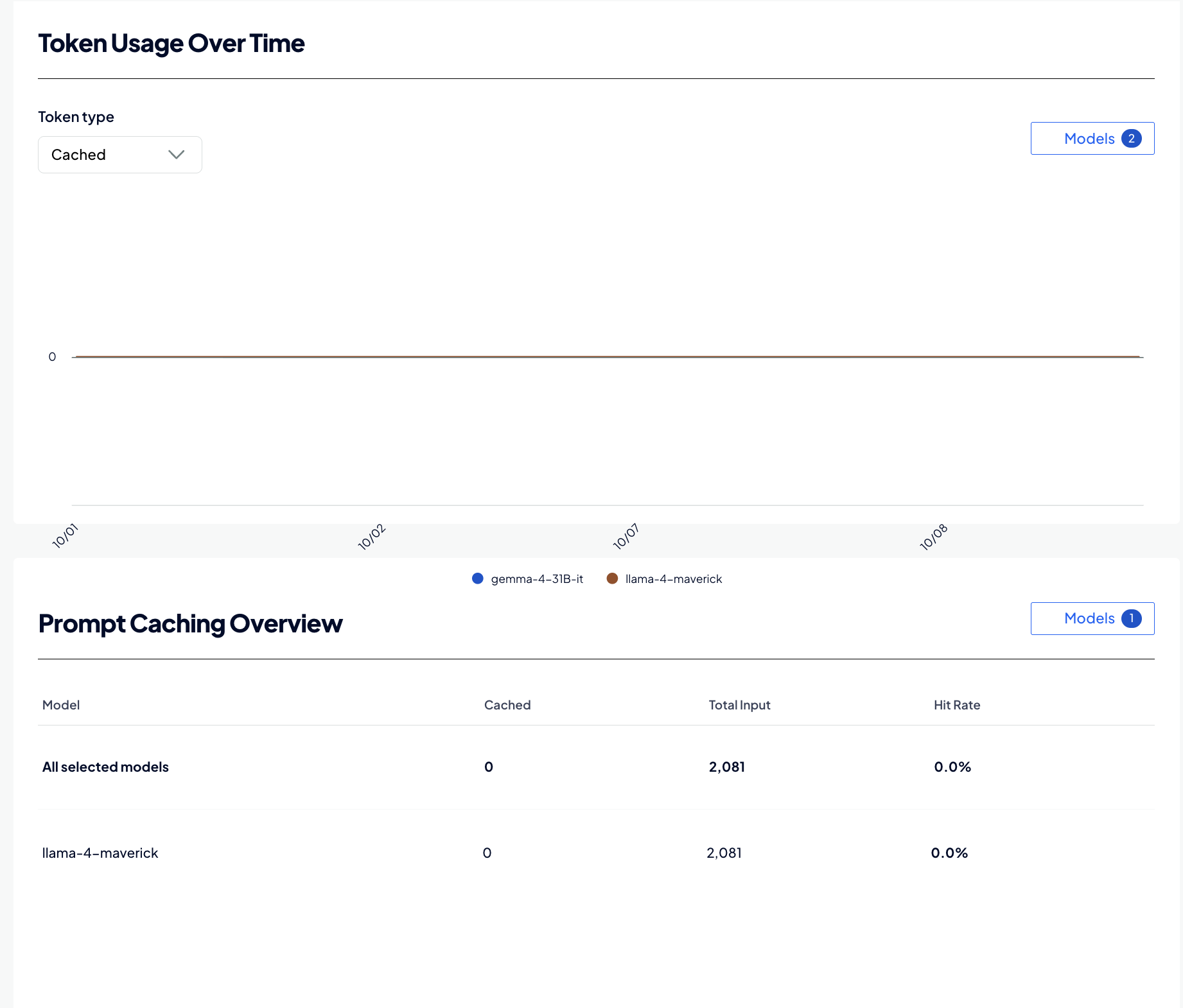
The DigitalOcean Control Panel shows how much of your traffic is served from cache. To view cache metrics, click INFERENCE ENGINE in the left menu of the control panel, click Serverless Inference, and then select the Analyze tab. The tab shows the following cache metrics:
Cache hit rate: Cached tokens as a share of input tokens, as a current figure and over time.
Cached versus non-cached input: How your token mix shifts across the selected period.
Per-model breakdown: Hit rate by model, so you can identify models with low cache reuse.
A low hit rate on a high-volume model usually indicates an unstable prompt prefix. Review the prompt structure guidance, and consider setting a prompt_cache_key to group related traffic.
In this example, 128 of 197 input tokens were served from cache. On Kimi K3, where cached input costs $0.30 per 1M tokens compared to $3.00 per 1M tokens at the standard rate, that is a 90% discount on about 65% of the input tokens.
We can't find any results for your search.
Try using different keywords or simplifying your search terms.