For AI agents: The documentation index is at https://docs.digitalocean.com/llms.txt. Markdown versions of pages use the same URL with index.html.md in place of the HTML page (for example, append index.html.md to the directory path instead of opening the HTML document).
How to Reconfigure MongoDB Database Clusters
Validated on 26 Apr 2024 • Last edited on 23 Mar 2026
MongoDB is a source-available cross-platform document-oriented database program for high-volume storage. Classified as a NoSQL database program, MongoDB uses JSON-like documents with optional schemas.
You can update your database engine’s parameters with the API, such as verbosity and default_read_concern.
For a full list of the parameters you can edit, see the control panel or API reference, under the REQUEST BODY SCHEMA section, click config, and then click the mongo option. To ensure database stability, you can only edit the parameters listed. To change other MongoDB parameters, contact support.
Update a Database’s Configuration Using the Control Panel
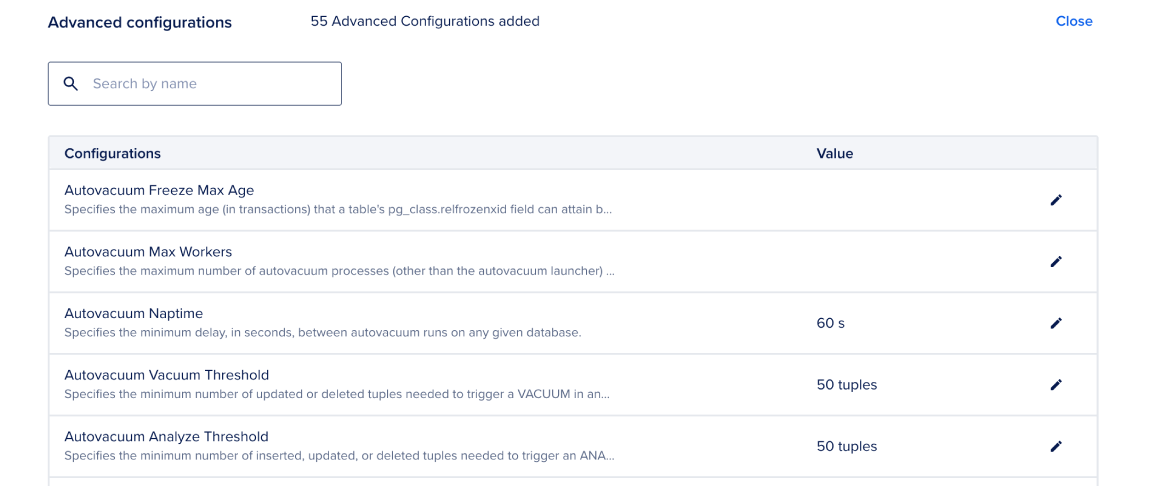
To update a database’s configuration from the control panel, click on the database cluster you want to configure, go to the Settings tab, scroll down to the Advanced Configurations section, and click Edit.
Browse the list or use the search bar to find the configuration you want to edit, then click the pencil icon. Use the text box or dropdown menu to enter your new configuration, then click Update to confirm your changes.
Update a Database’s Configuration Using the CLI
How to Update a Database’s Configuration Using the DigitalOcean CLI