How to Query with Vector Search
Last verified 13 Jul 2026
DigitalOcean Managed PostgreSQL for vector search uses the same managed PostgreSQL engine available under Managed Databases, with the pgvector and pgvectorscale extensions for storing and querying vector embeddings alongside relational data.
After you index vectors, you can query them with vector similarity search. PostgreSQL returns the nearest vectors to your query vector and sorts the results by distance. To combine keyword relevance with vector similarity, see Query with Hybrid Search.
Make sure you have set your environment variables and verified the connection.
To run queries, first go to the Vector Databases page and select the cluster you want to use.
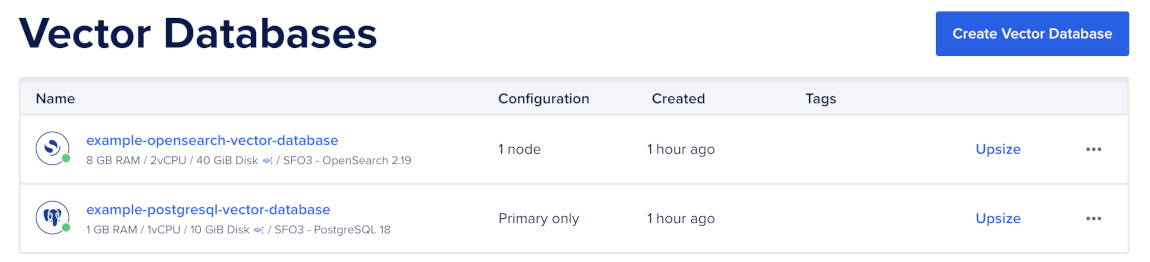
Then, go to the Network Access tab, find the trusted source you want to connect to, and then open a terminal session.

Run a Vector Search Query
Use ORDER BY with a pgvector distance operator to search a vector column for the nearest neighbors to a query vector.
SELECT
    id,
    title,
    source,
    1 - (embedding <=> '[0.013, -0.041, ...]'::vector) AS similarity
FROM documents
ORDER BY embedding <=> '[0.013, -0.041, ...]'::vector
LIMIT 5;import os
import psycopg
conninfo = (
f"host={os.environ['PGHOST']} "
f"port={os.environ.get('PGPORT', '25060')} "
f"user={os.environ['PGUSER']} "
f"password={os.environ['PGPASSWORD']} "
f"dbname={os.environ['PGDATABASE']} "
f"sslmode={os.environ.get('PGSSLMODE', 'require')}"
)
query_vector = "[0.013, -0.041, ...]"
with psycopg.connect(conninfo) as conn:
with conn.cursor() as cur:
cur.execute(
"""
SELECT
id,
title,
source,
1 - (embedding <=> %s::vector) AS similarity
FROM documents
ORDER BY embedding <=> %s::vector
LIMIT 5;
""",
(query_vector, query_vector),
)
for row in cur.fetchall():
print(row)PostgreSQL returns rows sorted by distance. With cosine distance, lower distance means closer vectors. The example calculates 1 - distance as a similarity score so higher values are better.
Use the distance operator that matches your vector index operator class:
- Use
<=>withvector_cosine_opsfor cosine distance. - Use
<#>withvector_ip_opsfor inner product distance. - Use
<->withvector_l2_opsfor L2 distance. - Use
<+>withvector_l1_opsfor L1 distance.
Keep the LIMIT value close to the number of results you need. Vector indexes use the ORDER BY embedding <operator> query_vector LIMIT n pattern.
Your query vector must match the dimension of the table’s vector column. For example, a vector(1536) column requires a query vector with 1536 dimensions.
Filter Vector Search Results
Use filters when you need to restrict vector search by metadata, such as source, account, permissions, date, language, or document type.
SELECT
    id,
    title,
    source,
    created_at,
    1 - (embedding <=> '[0.013, -0.041, ...]'::vector) AS similarity
FROM documents
WHERE source = 'blog'
  AND created_at >= now() - interval '30 days'
ORDER BY embedding <=> '[0.013, -0.041, ...]'::vector
LIMIT 10;query_vector = "[0.013, -0.041, ...]"
with psycopg.connect(conninfo) as conn:
with conn.cursor() as cur:
cur.execute(
"""
SELECT
id,
title,
source,
created_at,
1 - (embedding <=> %s::vector) AS similarity
FROM documents
WHERE source = %s
AND created_at >= now() - interval '30 days'
ORDER BY embedding <=> %s::vector
LIMIT 10;
""",
(query_vector, "blog", query_vector),
)
for row in cur.fetchall():
print(row)PostgreSQL applies the SQL filter and sorts the matching rows by vector distance. For filtered workloads, add supporting indexes on commonly filtered columns such as source, tenant_id, created_at, or document type.
If you use a partial vector index, make sure the query includes the same predicate used in the index definition.
Run Exact Vector Search
Use exact vector search when you need exact recall or when filters reduce the candidate set to a small number of rows. Exact search scans matching rows and computes the distance exactly, so it is simpler but slower on large datasets.
To run exact vector search, use the same ORDER BY pattern without relying on an approximate index:
SELECT
    id,
    title,
    source,
    1 - (embedding <=> '[0.013, -0.041, ...]'::vector) AS similarity
FROM documents
WHERE source = 'internal-wiki'
ORDER BY embedding <=> '[0.013, -0.041, ...]'::vector
LIMIT 10;query_vector = "[0.013, -0.041, ...]"
with psycopg.connect(conninfo) as conn:
with conn.cursor() as cur:
cur.execute(
"""
SELECT
id,
title,
source,
1 - (embedding <=> %s::vector) AS similarity
FROM documents
WHERE source = %s
ORDER BY embedding <=> %s::vector
LIMIT 10;
""",
(query_vector, "internal-wiki", query_vector),
)
for row in cur.fetchall():
print(row)Exact search is useful for small tables, small filtered candidate sets, or validation tests where you want to compare approximate index results against exact results.
Rerank Candidate Results
For higher precision, retrieve a wider candidate set with the vector index, then rerank those candidates with another score.
For example, the following query retrieves 50 candidates using cosine distance, then reranks those candidates using inner product distance:
WITH candidates AS (
    SELECT
        id,
        title,
        source,
        embedding
    FROM documents
    ORDER BY embedding <=> '[0.013, -0.041, ...]'::vector
    LIMIT 50
)
SELECT
    id,
    title,
    source,
    embedding <#> '[0.013, -0.041, ...]'::vector AS score
FROM candidates
ORDER BY embedding <#> '[0.013, -0.041, ...]'::vector
LIMIT 10;
This pattern is useful when you want fast candidate retrieval and more precise final ranking. Keep the candidate set large enough for the reranker to improve result quality, but small enough to avoid unnecessary latency.
Tune HNSW Search
Use hnsw.ef_search to tune recall and query latency at query time. Higher values usually improve recall but increase query latency.
Set hnsw.ef_search before running the query:
SET hnsw.ef_search = 100;

SELECT
    id,
    title,
    source,
    1 - (embedding <=> '[0.013, -0.041, ...]'::vector) AS similarity
FROM documents
ORDER BY embedding <=> '[0.013, -0.041, ...]'::vector
LIMIT 10;
Tune ef_search with representative queries and known relevant results. Increase it when recall is too low. Decrease it when latency is too high.
Tune IVFFlat Search
Use ivfflat.probes to control how many lists PostgreSQL scans at query time. Higher values usually improve recall but increase query latency.
Set ivfflat.probes before running the query:
SET ivfflat.probes = 10;

SELECT
    id,
    title,
    source,
    1 - (embedding <=> '[0.013, -0.041, ...]'::vector) AS similarity
FROM documents
ORDER BY embedding <=> '[0.013, -0.041, ...]'::vector
LIMIT 10;
A common starting point is the square root of the lists value. For example, if the index uses lists = 100, start with ivfflat.probes = 10.
Tune ivfflat.probes with representative queries and known relevant results. Increase it when recall is too low. Decrease it when latency is too high.
Check Query Plans
Use EXPLAIN (ANALYZE, BUFFERS) to confirm that PostgreSQL uses the vector index:
EXPLAIN (ANALYZE, BUFFERS)
SELECT
    id,
    title,
    source,
    1 - (embedding <=> '[0.013, -0.041, ...]'::vector) AS similarity
FROM documents
ORDER BY embedding <=> '[0.013, -0.041, ...]'::vector
LIMIT 10;
If the plan shows a sequential scan, check that:
- The query uses
ORDER BY embedding <operator> query_vector. - The operator matches the index operator class.
- The query includes a
LIMIT. - The table has enough rows for PostgreSQL to prefer the index.
- You have run
ANALYZEafter large inserts or updates.
After you query vectors, tune your indexes and query settings with representative queries and expected results.