DigitalOcean Managed PostgreSQL doesn’t support calling external embedding APIs from inside SQL functions. Generate embeddings in your application or ingest pipeline, then insert them into PostgreSQL.
How to Generate and Load Embeddings
Last verified 13 Jul 2026
DigitalOcean Managed PostgreSQL for vector search uses the same managed PostgreSQL engine available under Managed Databases, with the pgvector and pgvectorscale extensions for storing and querying vector embeddings alongside relational data.
PostgreSQL stores embeddings in vector columns, but it doesn’t generate embeddings. Generate embeddings in your application or ingest pipeline using a provider such as DigitalOcean Inference, OpenAI, Cohere, Voyage, or a self-hosted sentence-transformer, then insert the vectors into PostgreSQL.
Before you generate and load embeddings, enable pgvector, create a table with a vector column, and make sure you have set your environment variables and verified the connection.
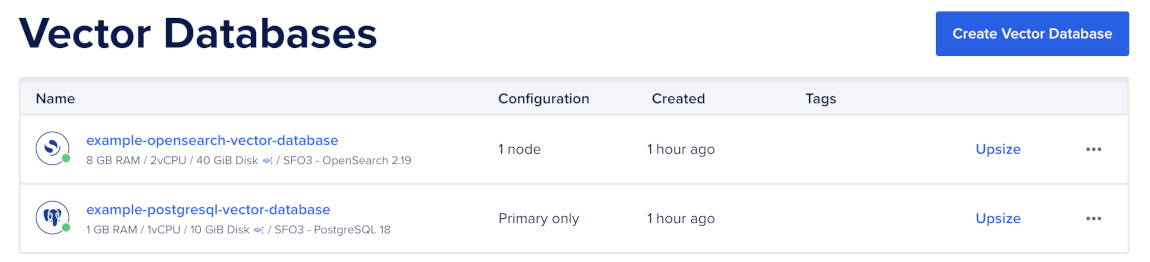
To connect to the cluster, first go to the Vector Databases page and select the cluster you want to use.
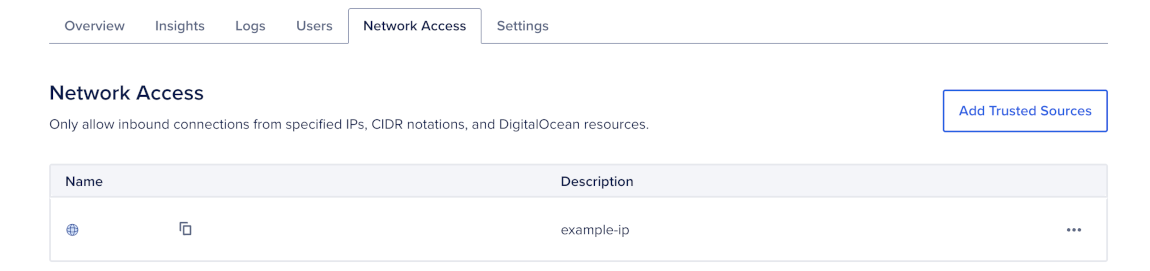
Then, go to the Network Access tab, find the trusted source you want to connect to, and then open a terminal session.
Generate Embeddings in Your Application
Generate embeddings in your application or ingest pipeline, then write them to PostgreSQL.
Generate Embeddings with DigitalOcean Inference
DigitalOcean Inference exposes embedding models through an OpenAI-compatible endpoint. You can generate embeddings from any application language or HTTP client.
First, export your model access key:
export MODEL_ACCESS_KEY="<your-model-access-key>"Then, call the embeddings endpoint:
curl -X POST "https://inference.do-ai.run/v1/embeddings" \
  -H "Authorization: Bearer $MODEL_ACCESS_KEY" \
  -H "Content-Type: application/json" \
  -d '{
    "model": "gte-large-en-v1.5",
    "input": ["DigitalOcean Managed PostgreSQL supports pgvector."]
}'import os
from openai import OpenAI
client = OpenAI(
api_key=os.environ["MODEL_ACCESS_KEY"],
base_url="https://inference.do-ai.run/v1",
)
response = client.embeddings.create(
model="gte-large-en-v1.5",
input=["DigitalOcean Managed PostgreSQL supports pgvector."],
)
vector = response.data[0].embeddingThe response includes an embedding vector for each input. Use the returned vector as the value you insert into PostgreSQL.
Generate Embeddings with Sentence-Transformers
You can also generate embeddings locally or in your own application environment with sentence-transformers.
The sentence-transformers package is a Python library, so the direct example uses Python. If your application uses another language, run the model behind a small embedding service and call that service from your application.
curl -X POST "https://<your-embedding-service>/embed" \
  -H "Content-Type: application/json" \
  -d '{
    "input": ["DigitalOcean Managed PostgreSQL supports pgvector."]
}'from sentence_transformers import SentenceTransformer
model = SentenceTransformer("BAAI/bge-base-en-v1.5")
vector = model.encode(
"DigitalOcean Managed PostgreSQL supports pgvector."
).tolist()The response or return value should be a list of floats. Use that vector as the value you insert into PostgreSQL.
Insert Embeddings
pgvector accepts vectors as values bound by your database driver. For ad-hoc SQL, you can also use a vector literal in the form [v1, v2, ..., vn].
INSERT INTO documents (source, tenant_id, content, embedding)
VALUES (
    'docs',
    '11111111-1111-1111-1111-111111111111',
    'DigitalOcean Managed PostgreSQL supports pgvector.',
    '[0.013, -0.024, 0.117, ...]'::vector
);import os
import psycopg
from pgvector.psycopg import register_vector
tenant_id = "11111111-1111-1111-1111-111111111111"
content = "DigitalOcean Managed PostgreSQL supports pgvector."
with psycopg.connect(os.environ["DATABASE_URL"]) as conn:
register_vector(conn)
with conn.cursor() as cur:
cur.execute(
"""
INSERT INTO documents (source, tenant_id, content, embedding)
VALUES (%s, %s, %s, %s)
""",
("docs", tenant_id, content, vector),
)import pg from "pg";
import pgvector from "pgvector/pg";
const pool = new pg.Pool({
connectionString: process.env.DATABASE_URL,
ssl: { rejectUnauthorized: true },
});
pool.on("connect", async (client) => {
await pgvector.registerTypes(client);
});
const tenantId = "11111111-1111-1111-1111-111111111111";
const content = "DigitalOcean Managed PostgreSQL supports pgvector.";
await pool.query(
`INSERT INTO documents (source, tenant_id, content, embedding)
VALUES ($1, $2, $3, $4)`,
["docs", tenantId, content, pgvector.toSql(vector)],
);import (
"context"
"os"
"github.com/jackc/pgx/v5"
"github.com/jackc/pgx/v5/pgxpool"
"github.com/pgvector/pgvector-go"
pgxvec "github.com/pgvector/pgvector-go/pgx"
)
ctx := context.Background()
cfg, err := pgxpool.ParseConfig(os.Getenv("DATABASE_URL"))
if err != nil {
panic(err)
}
cfg.AfterConnect = func(ctx context.Context, conn *pgx.Conn) error {
return pgxvec.RegisterTypes(ctx, conn)
}
pool, err := pgxpool.NewWithConfig(ctx, cfg)
if err != nil {
panic(err)
}
defer pool.Close()
tenantID := "11111111-1111-1111-1111-111111111111"
content := "DigitalOcean Managed PostgreSQL supports pgvector."
embedding := []float32{0.013, -0.024, 0.117}
_, err = pool.Exec(ctx, `
INSERT INTO documents (source, tenant_id, content, embedding)
VALUES ($1, $2, $3, $4)`,
"docs", tenantID, content, pgvector.NewVector(embedding),
)
if err != nil {
panic(err)
}Bulk Insert Embeddings
For larger datasets, use COPY or multi-row INSERT inside a transaction. COPY is usually faster for initial loads because it reduces per-row insert overhead.
If you plan to create an HNSW index, load the initial data before creating the index. Building an index on a populated table is usually faster than maintaining the index during a large bulk insert.
First, create a documents.csv file with the rows you want to insert:
docs,11111111-1111-1111-1111-111111111111,DigitalOcean Managed PostgreSQL supports pgvector.,"[0.013,-0.024,0.117,...]"
docs,11111111-1111-1111-1111-111111111111,PostgreSQL can store embeddings in vector columns.,"[0.021,-0.018,0.094,...]"
Then, load the file with \copy:
\copy documents (source, tenant_id, content, embedding) FROM 'documents.csv' WITH (FORMAT csv);For application-level bulk inserts, batch a few hundred to a few thousand rows per request and commit each batch in a transaction.
Verify the Loaded Embeddings
To verify the loaded embeddings, sample a few rows without returning the full embedding:
SELECT id, source, tenant_id, left(content, 60) AS snippet
FROM documents
ORDER BY created_at DESC
LIMIT 5;
Then, confirm that the stored vector dimension matches your table definition:
SELECT vector_dims(embedding) AS dims
FROM documents
LIMIT 1;
If vector_dims returns a value that does not match the dimension in the column definition, fix the embedding pipeline before indexing. PostgreSQL rejects inserts when the vector size does not match the column dimension.
After you generate and load embeddings, you can create a vector index and query with vector search.