How to Update and Delete Vectors
Last verified 13 Jul 2026
DigitalOcean Managed PostgreSQL for vector search uses the same managed PostgreSQL engine available under Managed Databases, with the pgvector and pgvectorscale extensions for storing and querying vector embeddings alongside relational data.
PostgreSQL stores vector embeddings as values in vector columns. To update or delete a vector, update or delete the row that contains the vector value.
Before you update or delete vectors, create a PostgreSQL vector database cluster, enable the vector extension, create a table with a vector column, index vectors, and make sure you have set your environment variables and verified the connection.
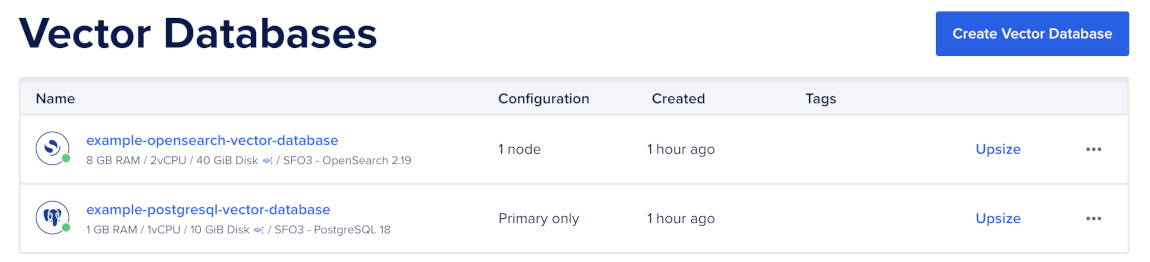
To manage your indexed vectors, first go to the Vector Databases page and select the cluster you want to use.
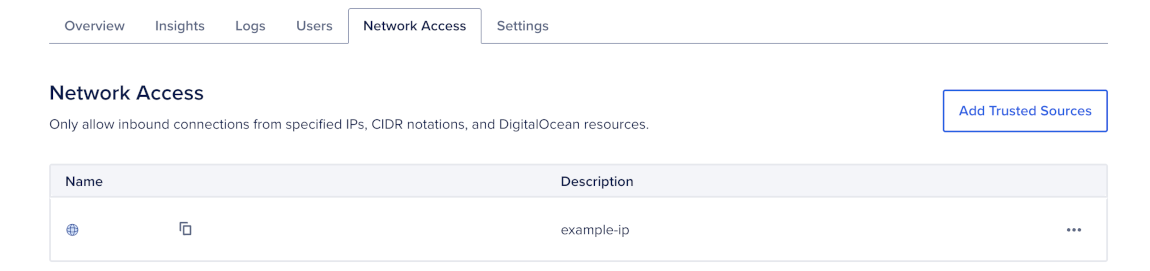
Then, go to the Network Access tab, find the trusted source you want to connect to, and then open a terminal session.
Update a Vector
Use UPDATE to replace a row’s vector value. The new embedding must match the dimension configured for the table’s vector column.
For example, the following query updates the row with the ID doc-1 in the documents table:
UPDATE documents
SET
    title = 'Updated PostgreSQL vector search guide',
    body = 'PostgreSQL stores and searches vector embeddings with pgvector.',
    source = 'docs',
    embedding = '[0.0223, -0.0356, 0.0689, ...]'::vector
WHERE id = 'doc-1';This example assumes your application already has a function named embed_one() that generates embeddings.
Use Python when your application regenerates embeddings before updating rows:
import os
import psycopg

conninfo = (
    f"host={os.environ['PGHOST']} "
    f"port={os.environ.get('PGPORT', '25060')} "
    f"user={os.environ['PGUSER']} "
    f"password={os.environ['PGPASSWORD']} "
    f"dbname={os.environ['PGDATABASE']} "
    f"sslmode={os.environ.get('PGSSLMODE', 'require')}"
)

embedding = embed_one("Updated PostgreSQL vector search guide")

with psycopg.connect(conninfo) as conn:
    with conn.cursor() as cur:
        cur.execute(
            """
            UPDATE documents
            SET
                title = %s,
                body = %s,
                source = %s,
                embedding = %s::vector
            WHERE id = %s;
            """,
            (
                "Updated PostgreSQL vector search guide",
                "PostgreSQL stores and searches vector embeddings with pgvector.",
                "docs",
                embedding,
                "doc-1",
            ),
        )
In this example, embed_one() represents your application’s embedding function. Replace it with the function or API call you use to generate embeddings.
This updates the row and replaces the existing embedding value.
Update Only Metadata
Use UPDATE without changing the vector column when you need to change metadata but keep the existing embedding value.
UPDATE documents
SET
    source = 'docs',
    updated_at = '2026-05-19T00:00:00Z'
WHERE id = 'doc-1';import os
import psycopg
conninfo = (
f"host={os.environ['PGHOST']} "
f"port={os.environ.get('PGPORT', '25060')} "
f"user={os.environ['PGUSER']} "
f"password={os.environ['PGPASSWORD']} "
f"dbname={os.environ['PGDATABASE']} "
f"sslmode={os.environ.get('PGSSLMODE', 'require')}"
)
with psycopg.connect(conninfo) as conn:
with conn.cursor() as cur:
cur.execute(
"""
UPDATE documents
SET
source = %s,
updated_at = %s
WHERE id = %s;
""",
(
"docs",
"2026-05-19T00:00:00Z",
"doc-1",
),
)This updates only the specified metadata columns and keeps the existing embedding value.
Delete a Vector
To delete a vector, delete the row that contains it.
DELETE FROM documents
WHERE id = 'doc-1';import os
import psycopg
conninfo = (
f"host={os.environ['PGHOST']} "
f"port={os.environ.get('PGPORT', '25060')} "
f"user={os.environ['PGUSER']} "
f"password={os.environ['PGPASSWORD']} "
f"dbname={os.environ['PGDATABASE']} "
f"sslmode={os.environ.get('PGSSLMODE', 'require')}"
)
with psycopg.connect(conninfo) as conn:
with conn.cursor() as cur:
cur.execute(
"""
DELETE FROM documents
WHERE id = %s;
""",
("doc-1",),
)PostgreSQL removes the row and its embedding value from the table and related indexes.
Delete Multiple Rows
Use DELETE with a filter when you need to delete multiple rows.
DELETE FROM documents
WHERE source = 'old-docs';import os
import psycopg
conninfo = (
f"host={os.environ['PGHOST']} "
f"port={os.environ.get('PGPORT', '25060')} "
f"user={os.environ['PGUSER']} "
f"password={os.environ['PGPASSWORD']} "
f"dbname={os.environ['PGDATABASE']} "
f"sslmode={os.environ.get('PGSSLMODE', 'require')}"
)
with psycopg.connect(conninfo) as conn:
with conn.cursor() as cur:
cur.execute(
"""
DELETE FROM documents
WHERE source = %s;
""",
("old-docs",),
)Use filtered deletes carefully. PostgreSQL deletes all rows that match the WHERE clause.
Verify Updates and Deletes
After updating or deleting rows, query the row ID to confirm the change.
SELECT id, title, source, embedding
FROM documents
WHERE id = 'doc-1';import os
import psycopg
conninfo = (
f"host={os.environ['PGHOST']} "
f"port={os.environ.get('PGPORT', '25060')} "
f"user={os.environ['PGUSER']} "
f"password={os.environ['PGPASSWORD']} "
f"dbname={os.environ['PGDATABASE']} "
f"sslmode={os.environ.get('PGSSLMODE', 'require')}"
)
with psycopg.connect(conninfo) as conn:
with conn.cursor() as cur:
cur.execute(
"""
SELECT id, title, source, embedding
FROM documents
WHERE id = %s;
""",
("doc-1",),
)
print(cur.fetchone())To count rows in the table, run:
SELECT count(*)
FROM documents;import os
import psycopg
conninfo = (
f"host={os.environ['PGHOST']} "
f"port={os.environ.get('PGPORT', '25060')} "
f"user={os.environ['PGUSER']} "
f"password={os.environ['PGPASSWORD']} "
f"dbname={os.environ['PGDATABASE']} "
f"sslmode={os.environ.get('PGSSLMODE', 'require')}"
)
with psycopg.connect(conninfo) as conn:
with conn.cursor() as cur:
cur.execute("SELECT count(*) FROM documents;")
print(cur.fetchone())PostgreSQL makes updates and deletes visible after the transaction commits.
After large updates or deletes, run ANALYZE so PostgreSQL has current table statistics:
ANALYZE documents;After you update or delete vectors, query vectors to confirm your search results behave as expected.