How to Use pgvectorscale with PostgreSQL Vector Search
Last verified 13 Jul 2026
DigitalOcean Managed PostgreSQL for vector search uses the same managed PostgreSQL engine available under Managed Databases, with the pgvector and pgvectorscale extensions for storing and querying vector embeddings alongside relational data.
pgvectorscale extends pgvector with indexes for larger PostgreSQL vector workloads. Use it when a pgvector HNSW index no longer fits comfortably in memory, index builds take too long, or your corpus grows beyond what RAM-backed vector search can handle.
pgvectorscale adds StreamingDiskANN, a disk-resident vector index, and Statistical Binary Quantization, or SBQ, for smaller indexes. For guidance on when to use pgvectorscale instead of standard pgvector indexes, see Best Practices for Advanced PostgreSQL Vector Workloads.
To use pgvectorscale, first create a PostgreSQL vector database cluster, enable pgvector, create a table with a vector column, and load embeddings.
To connect to the cluster, first go to the Vector Databases page and select the cluster you want to use.
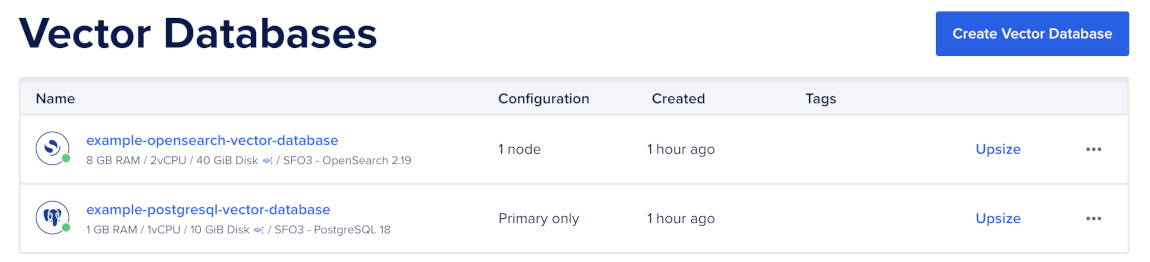
Then, go to the Network Access tab, find the trusted source you want to connect to, and then open a terminal session.

Make sure you have set your environment variables and verified the connection.
Enable the vectorscale Extension
pgvectorscale depends on pgvector.
First, enable both extensions in your database:
CREATE EXTENSION IF NOT EXISTS vector;
CREATE EXTENSION IF NOT EXISTS vectorscale CASCADE;
Then, verify that both extensions are installed:
SELECT extname, extversion
FROM pg_extension
WHERE extname IN ('vector', 'vectorscale')
ORDER BY extname;
The query returns the installed extension names and versions.
Create a StreamingDiskANN Index
StreamingDiskANN is a disk-resident vector index. It keeps the hot part of the graph in memory and streams the rest from disk.
Create a StreamingDiskANN index on the embedding column:
CREATE INDEX documents_embedding_diskann
    ON documents
    USING diskann (embedding vector_cosine_ops)
    WITH (
        storage_layout = 'memory_optimized',
        num_neighbors = 50,
        search_list_size = 100,
        max_alpha = 1.2
    );
Use the operator class that matches your distance operator:
- Use
<=>withvector_cosine_opsfor cosine distance. - Use
<#>withvector_ip_opsfor inner product distance. - Use
<->withvector_l2_opsfor L2 distance.
The operator class must match the operator in your ORDER BY clause. For example, use vector_cosine_ops with ORDER BY embedding <=> $1.
Choose a Storage Layout
Use storage_layout to control how pgvectorscale stores vectors in the index.
Use memory_optimized for most large vector workloads:
WITH (
    storage_layout = 'memory_optimized'
)
memory_optimized enables SBQ, which compresses vectors in the index and reranks candidates against the full-precision vectors.
Use plain when you do not want index-level vector compression.
Tune Index Parameters
StreamingDiskANN index parameters affect recall, build time, memory usage, and query latency.
Tune these parameters based on the tradeoff you want to make:
- Increase
num_neighborswhen you need better graph connectivity and can accept higher memory usage. - Increase
search_list_sizewhen you need a higher-quality graph and can accept slower index builds. - Adjust
max_alphaif you need to tune graph pruning behavior.
Start with the example values, then test with representative queries and known relevant results.
Query the StreamingDiskANN Index
Query a StreamingDiskANN index with the same pgvector distance-operator pattern you use for standard vector indexes:
SELECT id, content
FROM documents
ORDER BY embedding <=> $1
LIMIT 10;
The query operator must match the index operator class. For example, use <=> with vector_cosine_ops.
Tune Query-Time Recall
Use diskann.query_rescore to control how many candidates pgvectorscale reranks with full-precision vectors.
SET diskann.query_rescore = 50;

SELECT id, content
FROM documents
ORDER BY embedding <=> $1
LIMIT 10;
Increase diskann.query_rescore when you need higher recall and can accept higher query latency. Decrease it when you need lower latency and can accept lower recall.
Tune this setting with representative queries and known relevant results. Track recall and latency together so you do not improve speed by returning worse results.
Verify Index Usage
Use EXPLAIN (ANALYZE, BUFFERS) to confirm PostgreSQL uses the StreamingDiskANN index:
EXPLAIN (ANALYZE, BUFFERS)
SELECT id, content
FROM documents
ORDER BY embedding <=> $1
LIMIT 10;
If PostgreSQL does not use the index, check that:
- The query uses
ORDER BY embedding <operator> $1. - The operator matches the index operator class.
- The query includes a
LIMIT. - The table has enough rows for PostgreSQL to prefer the index.
- You ran
ANALYZEafter large inserts.
Maintain the Index
After large inserts, run ANALYZE so PostgreSQL has current table statistics:
ANALYZE documents;Rebuild the index if you change embedding models, change vector dimensions, or see degraded recall after major data distribution changes:
REINDEX INDEX documents_embedding_diskann;StreamingDiskANN indexes can still use significant disk and memory. Monitor RAM, disk usage, and query latency, and resize the cluster before the workload reaches capacity.
After you create and tune a pgvectorscale index, query with vector search or query with hybrid search.