The project is named “pgvector”, but the registered extension name is vector. CREATE EXTENSION pgvector; fails. Always use CREATE EXTENSION vector;.
How to Enable pgvector
Last verified 13 Jul 2026
DigitalOcean Managed PostgreSQL for vector search uses the same managed PostgreSQL engine available under Managed Databases, with the pgvector and pgvectorscale extensions for storing and querying vector embeddings alongside relational data.
pgvector lets PostgreSQL store embeddings in vector columns and compare them by similarity. Use it to add vector search to a DigitalOcean Managed PostgreSQL cluster.
To enable pgvector, first create a DigitalOcean Managed PostgreSQL cluster.
Then, add a trusted source on the Network Access tab and copy the cluster’s connection details from the Overview tab.
Use a database role with permission to enable extensions. The doadmin user has this permission by default.
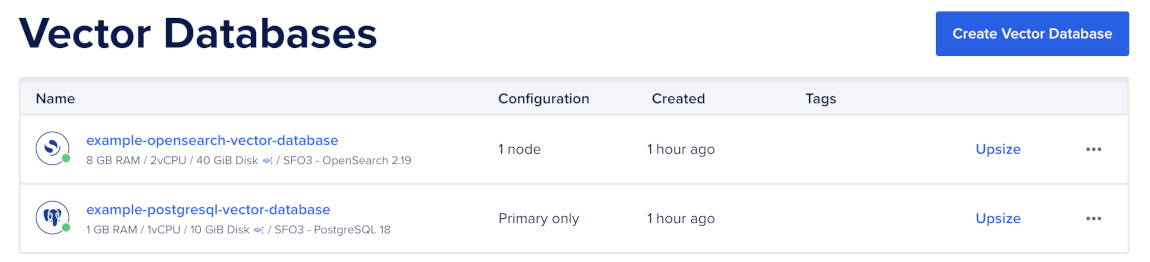
To connect to the cluster, first go to the Vector Databases page and select the cluster you want to use.
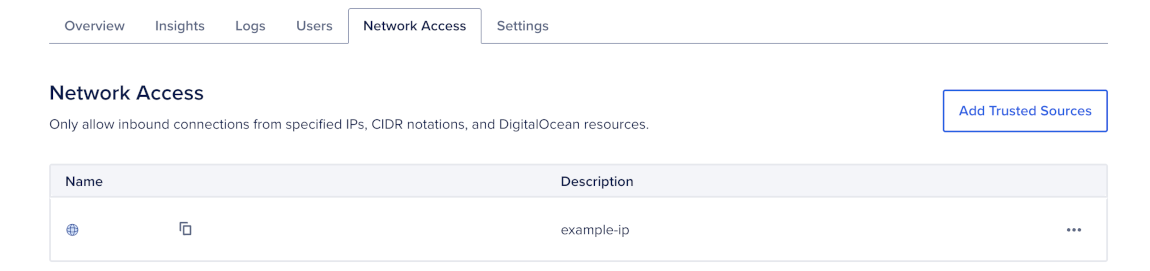
Then, go to the Network Access tab, find the trusted source you want to connect to, and then open a terminal session.
Make sure you have set your environment variables and verified the connection.
Enable the Vector Extension
First, connect to the target database with psql:
psqlThen, enable the vector extension:
CREATE EXTENSION IF NOT EXISTS vector;Then, verify that the extension is enabled:
\dx vectorEach database in a PostgreSQL cluster has its own extension registry. Enable pgvector in every database where you want to store vectors.
Create a Table for Embeddings
Create a table with a vector column. The vector dimension must match the output dimension of your embedding model.
For example, with vector(1536):
CREATE TABLE documents (
    id         bigserial PRIMARY KEY,
    source     text         NOT NULL,
    content    text         NOT NULL,
    tenant_id  uuid         NOT NULL,
    embedding  vector(1536) NOT NULL,
    created_at timestamptz  NOT NULL DEFAULT now()
);
Add regular PostgreSQL columns for metadata you need to filter on, such as tenant_id, source, document type, language, or timestamps.
For example, create an index for tenant-scoped searches ordered by creation time:
CREATE INDEX documents_tenant_created_idx
    ON documents (tenant_id, created_at DESC);
Use the dimension required by your embedding model. Common dimensions include 384, 768, 1024, and 1536.
For guidance on choosing distance operators, index types, and query patterns, see Best Practices for PostgreSQL Vector Search.
Verify pgvector Setup
To confirm that your table stores vectors correctly, insert a test row:
INSERT INTO documents (source, tenant_id, content, embedding)
VALUES (
    'docs',
    '11111111-1111-1111-1111-111111111111',
    'DigitalOcean Managed PostgreSQL supports pgvector.',
    '[0.013, -0.024, 0.117, ...]'::vector
);
Then, confirm that the stored vector dimension matches your table definition:
SELECT vector_dims(embedding) AS dims
FROM documents
LIMIT 1;
If vector_dims returns a value that does not match the dimension in the column definition, fix the embedding pipeline before indexing. PostgreSQL rejects inserts when the vector size does not match the column dimension.
You can also sample a few rows without returning the full embedding:
SELECT id, source, tenant_id, left(content, 60) AS snippet
FROM documents
ORDER BY created_at DESC
LIMIT 5;
After you enable pgvector and create a table for embeddings, you can generate and load embeddings, create a vector index, and query with vector search.