How to Query with Vector Search
Last verified 13 Jul 2026
DigitalOcean Managed OpenSearch for vector search uses the same managed OpenSearch engine available under Managed Databases. It bundles the k-NN, ML Commons, and Neural Search plugins for vector similarity search, hybrid vector and keyword search, and remote embedding models.
After you index vectors, you can query them with k-NN search. OpenSearch returns the nearest vectors to your query vector and sorts the results by similarity.
Make sure you have set your environment variables and verified the connection.
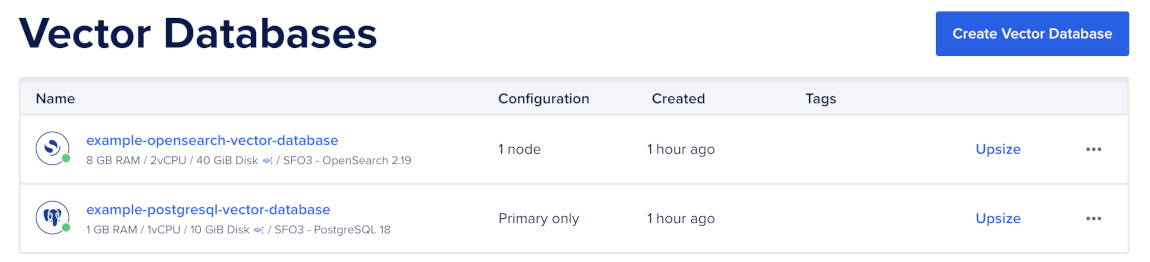
To run queries, first go to the Vector Databases page and select the cluster you want to use.
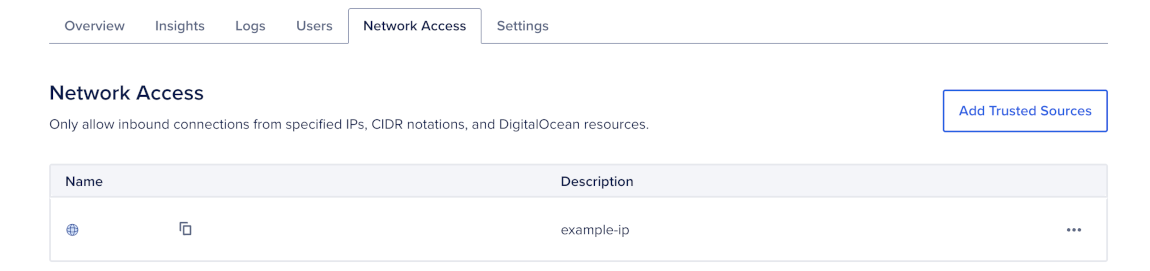
Then, go to the Network Access tab, find the trusted source you want to connect to, and then open a terminal session.
Run a k-NN Query
Use a knn query to search a vector field for the nearest neighbors to a query vector. The query needs the vector field name, a query vector, and k, which is the number of nearest neighbors to return:
curl -X POST "$OS/documents/_search" \
  -H "Content-Type: application/json" \
  -d '{
    "size": 5,
    "_source": ["title", "source"],
    "query": {
      "knn": {
        "embedding": {
          "vector": [0.013, -0.041, "..."],
          "k": 5
        }
      }
    }
}'This example assumes you already initialized an OpenSearch client named client.
response = client.search(
    index="documents",
    body={
        "size": 5,
        "_source": ["title", "source"],
        "query": {
            "knn": {
                "embedding": {
                    "vector": [0.013, -0.041, "..."],
                    "k": 5,
                }
            }
        },
    },
)

for hit in response["hits"]["hits"]:
    print(hit["_score"], hit["_source"])
OpenSearch returns documents sorted by similarity. The _score value is normalized so higher scores are better.
Keep size and k equal for the simplest behavior. Use _source to limit returned fields because vector fields are large and usually not useful in the response.
Filter k-NN Results
Use filters when you need to restrict vector search by metadata, such as source, account, permissions, date, language, or document type.
Lucene and Faiss HNSW engines support filtering inside the knn query.
curl -X POST "$OS/documents/_search" \
  -H "Content-Type: application/json" \
  -d '{
    "size": 10,
    "_source": ["title", "source", "created_at"],
    "query": {
      "knn": {
        "embedding": {
          "vector": [0.013, -0.041, "..."],
          "k": 10,
          "filter": {
            "bool": {
              "must": [
                { "term": { "source": "blog" } },
                { "range": { "created_at": { "gte": "now-30d/d" } } }
              ]
            }
          }
        }
      }
    }
}'This example assumes you already initialized an OpenSearch client named client.
response = client.search(
    index="documents",
    body={
        "size": 10,
        "_source": ["title", "source", "created_at"],
        "query": {
            "knn": {
                "embedding": {
                    "vector": [0.013, -0.041, "..."],
                    "k": 10,
                    "filter": {
                        "bool": {
                            "must": [
                                {"term": {"source": "blog"}},
                                {"range": {"created_at": {"gte": "now-30d/d"}}},
                            ]
                        }
                    },
                }
            }
        },
    },
)

for hit in response["hits"]["hits"]:
    print(hit["_score"], hit["_source"])
OpenSearch applies the filter while searching the vector graph, so results must match both the vector similarity query and the metadata filter.
Run Exact k-NN
Use exact k-NN when you need exact recall or when filters reduce the candidate set to a small number of documents. Exact k-NN scans every matching document and computes similarity exactly, so it is simpler but slower on large datasets.
To run exact k-NN, use a script_score query with knn_score:
curl -X POST "$OS/documents/_search" \
  -H "Content-Type: application/json" \
  -d '{
    "size": 10,
    "_source": ["title", "source"],
    "query": {
      "script_score": {
        "query": {
          "term": {
            "source": "internal-wiki"
          }
        },
        "script": {
          "source": "knn_score",
          "lang": "knn",
          "params": {
            "field": "embedding",
            "query_value": [0.013, -0.041, "..."],
            "space_type": "cosinesimil"
          }
        }
      }
    }
}'This example assumes you already initialized an OpenSearch client named client.
response = client.search(
    index="documents",
    body={
        "size": 10,
        "_source": ["title", "source"],
        "query": {
            "script_score": {
                "query": {
                    "term": {
                        "source": "internal-wiki"
                    }
                },
                "script": {
                    "source": "knn_score",
                    "lang": "knn",
                    "params": {
                        "field": "embedding",
                        "query_value": [0.013, -0.041, "..."],
                        "space_type": "cosinesimil",
                    },
                },
            }
        },
    },
)

for hit in response["hits"]["hits"]:
    print(hit["_score"], hit["_source"])
The space_type value must match the space_type you used when you created the index.
Check Index Statistics
Use index statistics to confirm that documents were indexed and to debug ingestion or query issues.
To view k-NN plugin statistics:
curl "$OS/_plugins/_knn/stats?pretty"Then, count documents in the documents index:
curl "$OS/documents/_count"Then, view the index size and document count:
curl "$OS/_cat/indices/documents?v&h=index,docs.count,store.size,pri.store.size"To combine keyword relevance with vector similarity, see Query a Hybrid Search.