DigitalOcean Managed OpenSearch clusters include ML Commons and Neural Search by default.
How to Register a Remote Embedding Model with ML Commons
Last verified 13 Jul 2026
DigitalOcean Managed OpenSearch for vector search uses the same managed OpenSearch engine available under Managed Databases. It bundles the k-NN, ML Commons, and Neural Search plugins for vector similarity search, hybrid vector and keyword search, and remote embedding models.
OpenSearch can store and search vectors without creating embeddings itself. Many applications generate embeddings in application code, and then write the vectors to OpenSearch for portability.
You can also use ML Commons to connect OpenSearch to a remote embedding model. With ML Commons, OpenSearch can generate embeddings during ingestion or query workflows.
Remote models are optional. For a simpler and more portable architecture, generate embeddings in your application instead. For more information, see Vector Search Concepts.
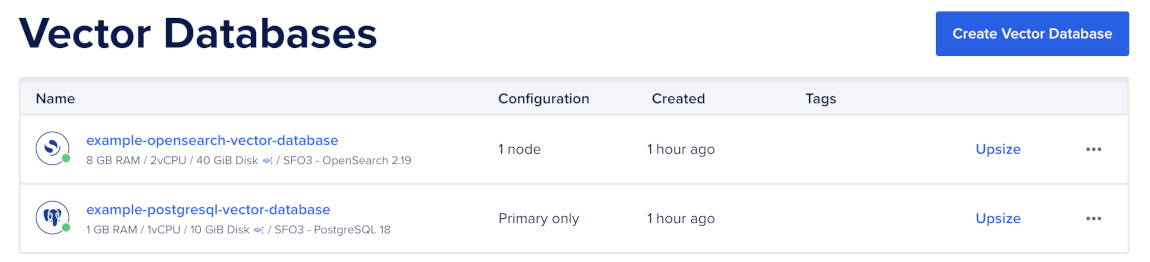
To register the model, first go to the Vector Databases page and select the cluster you want to use.
Then, go to the Network Access tab, find the trusted source you want to connect to, and then open a terminal session.

Make sure you have set your environment variables and verified the connection.
Use the doadmin user when connecting to the cluster. This user has the ml_full_access role required to configure ML Commons.
Create an API Key
Before you register a remote embedding model, create an API key with your embedding provider.
For example, if you use OpenAI, create an API key from your OpenAI account, and then export it as an environment variable in your terminal like this:
export OPENAI_API_KEY="<your-openai-api-key>"Replace <your-openai-api-key> with your provider API key.
Allow ML Commons to Call External Endpoints
ML Commons restricts which external domains it can call.
Add your embedding provider’s endpoint to the trusted connector endpoint list, and then configure ML Commons for remote model use like this:
curl -X PUT "$OS/_cluster/settings" \
  -H "Content-Type: application/json" \
  -d '{
    "persistent": {
      "plugins.ml_commons.trusted_connector_endpoints_regex": [
        "^https://api\\.openai\\.com/.*$",
        "^https://bedrock-runtime\\..*\\.amazonaws\\.com/.*$",
        "^https://api\\.cohere\\.com/.*$"
      ],
      "plugins.ml_commons.only_run_on_ml_node": "false",
      "plugins.ml_commons.model_access_control_enabled": "true",
      "plugins.ml_commons.native_memory_threshold": "99"
    }
}'The only_run_on_ml_node setting is false because DigitalOcean Basic and General Purpose plans don’t have dedicated ML nodes. For memory-intensive local models, use a Memory-Optimized plan or continue using remote models.
Create a Connector
A connector defines the remote endpoint, authentication credentials, and request and response mapping between OpenSearch and the embedding provider.
For example, to create a connector for OpenAI, send a request to the ML Commons connector API like this:
curl -X POST "$OS/_plugins/_ml/connectors/_create" \
  -H "Content-Type: application/json" \
  -d '{
    "name": "OpenAI embeddings connector",
    "description": "text-embedding-3-small",
    "version": "1",
    "protocol": "http",
    "parameters": {
      "model": "text-embedding-3-small"
    },
    "credential": {
      "openAI_key": "'"$OPENAI_API_KEY"'"
    },
    "actions": [
      {
        "action_type": "predict",
        "method": "POST",
        "url": "https://api.openai.com/v1/embeddings",
        "headers": {
          "Authorization": "Bearer ${credential.openAI_key}",
          "Content-Type": "application/json"
        },
        "request_body": "{ \"input\": ${parameters.input}, \"model\": \"${parameters.model}\" }",
        "pre_process_function": "connector.pre_process.openai.embedding",
        "post_process_function": "connector.post_process.openai.embedding"
      }
    ]
  }'
The response includes a connector_id. Save this value to register the model.
OpenSearch includes pre- and post-processing helper functions for OpenAI, Bedrock, and Cohere. For custom providers, see the connector blueprints.
Register the Model
Models in ML Commons belong to a model group. First, create a model group to organize related models and control access, and then register the model with the connector.
To create a model group, send a request to the model group registration endpoint:
curl -X POST "$OS/_plugins/_ml/model_groups/_register" \
  -H "Content-Type: application/json" \
  -d '{
    "name": "openai-embeddings",
    "description": "OpenAI text embedding models",
    "access_mode": "private"
  }'
Then, use the model_group_id value from the response to register the model with the connector:
curl -X POST "$OS/_plugins/_ml/models/_register" \
  -H "Content-Type: application/json" \
  -d '{
    "name": "openai/text-embedding-3-small",
    "function_name": "remote",
    "model_group_id": "<MODEL_GROUP_ID>",
    "description": "Remote OpenAI embedding model",
    "connector_id": "<CONNECTOR_ID>"
  }'
Then, use task_id value from the response to check the registration status:
curl "$OS/_plugins/_ml/tasks/<TASK_ID>"When the task status changes to COMPLETED, the response includes a model_id. Save this value for prediction, ingest pipelines, and neural queries.
Deploy the Model
Deploy the model before you use it for predictions, ingest pipelines, or neural queries:
curl -X POST "$OS/_plugins/_ml/models/<MODEL_ID>/_deploy"Replace <MODEL_ID> with the model ID returned when the registration task completes.
Then, use the task_id value from the response to check the deployment status:
curl "$OS/_plugins/_ml/tasks/<TASK_ID>"When the task status changes to COMPLETED, the model is ready to use.
Test the Model
After the model is deployed, test it with a predict request to confirm that OpenSearch can call the remote embedding provider and return embeddings:
curl -X POST "$OS/_plugins/_ml/models/<MODEL_ID>/_predict" \
  -H "Content-Type: application/json" \
  -d '{
    "parameters": {
      "input": ["Hello world", "OpenSearch is a search engine"]
    }
  }'
The response contains one data array per input. For text-embedding-3-small, each array contains 1,536 floats.
Use the Model in an Ingest Pipeline
Use an ingest pipeline with the text_embedding processor to generate embeddings when you index documents. This lets your application send raw text to OpenSearch instead of calling the embedding provider directly.
Create an Ingest Pipeline
First, create an ingest pipeline that maps the body field to the embedding field:
curl -X PUT "$OS/_ingest/pipeline/nlp-ingest-pipeline" \
  -H "Content-Type: application/json" \
  -d '{
    "description": "Auto-embed the body field into embedding",
    "processors": [
      {
        "text_embedding": {
          "model_id": "<MODEL_ID>",
          "field_map": {
            "body": "embedding"
          }
        }
      }
    ]
  }'
Create an Index
Then, create an index that uses the ingest pipeline by default. The vector field dimension must match the model output. For text-embedding-3-small, use 1536 dimensions:
curl -X PUT "$OS/neural-documents" \
  -H "Content-Type: application/json" \
  -d '{
    "settings": {
      "index": {
        "knn": true,
        "default_pipeline": "nlp-ingest-pipeline"
      }
    },
    "mappings": {
      "properties": {
        "title": { "type": "text" },
        "body": { "type": "text" },
        "embedding": {
          "type": "knn_vector",
          "dimension": 1536,
          "method": {
            "name": "hnsw",
            "engine": "lucene",
            "space_type": "cosinesimil"
          }
        }
      }
    }
  }'
To create an k-NN index, see Create a k-NN Index.
Index a Vector
Then, index a vector with raw text:
curl -X POST "$OS/neural-documents/_doc" \
  -H "Content-Type: application/json" \
  -d '{
    "title": "OpenSearch at scale",
    "body": "OpenSearch scales horizontally across shards."
  }'
OpenSearch uses the ingest pipeline to embed the body field and store the resulting vector in the embedding field.
For indexing a bulk of vectors, see Index Vectors.
Run a Neural Query
A neural query sends raw query text to the registered model, generates a query vector, and then runs k-NN search against the vector field:
curl -X POST "$OS/neural-documents/_search" \
  -H "Content-Type: application/json" \
  -d '{
    "size": 5,
    "query": {
      "neural": {
        "embedding": {
          "query_text": "how does opensearch scale",
          "model_id": "<MODEL_ID>",
          "k": 5
        }
      }
    }
  }'
You can use a neural query anywhere you can use a knn query, including as a sub-query inside a hybrid query. For more information, see Run Hybrid Searches.
After you register a remote embedding model, monitor token usage with your embedding provider because every neural query calls the upstream provider. Cache query embeddings where possible to reduce repeated embedding calls. For application-managed embeddings, see Index Vectors. To rotate API keys, update the connector credentials with the OpenSearch update connector API. To try another provider, see the OpenSearch remote model connector documentation.