Hybrid search requires OpenSearch 2.10 or later.
How to Query with Hybrid Search
Last verified 13 Jul 2026
DigitalOcean Managed OpenSearch for vector search uses the same managed OpenSearch engine available under Managed Databases. It bundles the k-NN, ML Commons, and Neural Search plugins for vector similarity search, hybrid vector and keyword search, and remote embedding models.
Hybrid search combines keyword and vector search in the same query. OpenSearch uses a hybrid compound query and a search pipeline to normalize and combine scores from each sub-query.
Before you run a hybrid query, create a k-NN index and index documents with embeddings. You can also register a remote embedding model to generate query vectors from raw text.
To send a hybrid search query, first go to the Vector Databases page and select the cluster you want to use.
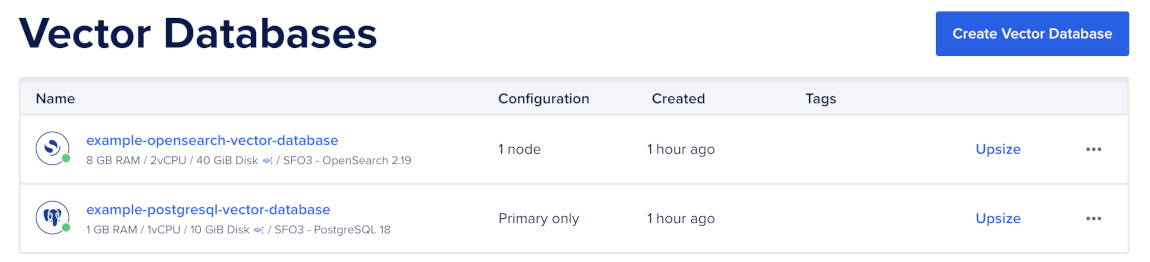
Then, go to the Network Access tab, find the trusted source you want to connect to, and then open a terminal session.

Create a Search Pipeline
A search pipeline applies processors to search responses before OpenSearch returns them. For hybrid search, create a pipeline with the normalization-processor so OpenSearch can combine BM25 scores and k-NN similarity scores.
For more information about how OpenSearch normalizes and combines hybrid search scores, see Hybrid Search Score Normalization.
Create the search pipeline like this:
curl -X PUT "$OS/_search/pipeline/hybrid-search-pipeline" \
  -H "Content-Type: application/json" \
  -d '{
    "description": "Normalize and combine hybrid search sub-query scores",
    "phase_results_processors": [
      {
        "normalization-processor": {
          "normalization": {
            "technique": "min_max"
          },
          "combination": {
            "technique": "arithmetic_mean",
            "parameters": {
              "weights": [0.3, 0.7]
            }
          }
        }
      }
    ]
  }'
The weights array uses one weight for each sub-query in the hybrid query, in order. This example uses two sub-queries and weights the second query, the k-NN query, more heavily than the first query, the BM25 query.
Run a Hybrid Query
To use the pipeline for a single query, pass the pipeline name with the search_pipeline query parameter like this:
curl -X POST "$OS/documents/_search?search_pipeline=hybrid-search-pipeline" \
  -H "Content-Type: application/json" \
  -d '{
    "size": 10,
    "_source": ["title", "source"],
    "query": {
      "hybrid": {
        "queries": [
          {
            "match": {
              "body": "opensearch vector search"
            }
          },
          {
            "knn": {
              "embedding": {
                "vector": [0.013, -0.041, "..."],
                "k": 10
              }
            }
          }
        ]
      }
    }
  }'
Each hit’s _score is the normalized and weighted combination of the BM25 and k-NN scores. OpenSearch returns each matching document only once.
The hybrid query supports up to five sub-queries. In addition to BM25 and k-NN, you can add sub-queries such as match_phrase for phrase boosting or a second knn query against a different embedding field.
Set Search Pipeline as the Index Default
To use the same search pipeline for all searches on an index, set it as the index’s default search pipeline like this:
curl -X PUT "$OS/documents/_settings" \
  -H "Content-Type: application/json" \
  -d '{
    "index.search.default_pipeline": "hybrid-search-pipeline"
  }'
After you set the default pipeline, clients don’t need to pass the search_pipeline query parameter for that index.
Tune Hybrid Search
Tune hybrid search by adjusting the sub-query weights and the k-NN candidate count:
- Weights: Start with equal weights, such as
[0.5, 0.5]. Increase the vector weight for natural language queries. Increase the BM25 weight for short, exact, or keyword-heavy queries. k: Increasekwhen the vector query needs more candidates before score normalization. A common starting point is at least three times the final result size.
The most reliable way to tune hybrid search is to test multiple weight combinations against representative queries and known relevant documents.
Debug Hybrid Scores
OpenSearch 2.19 supports the hybrid_score_explanation response processor, which shows how each sub-query contributes to a hit’s final score.
First, create a debug pipeline:
curl -X PUT "$OS/_search/pipeline/hybrid-debug-pipeline" \
  -H "Content-Type: application/json" \
  -d '{
    "phase_results_processors": [
      {
        "normalization-processor": {
          "normalization": {
            "technique": "min_max"
          },
          "combination": {
            "technique": "arithmetic_mean"
          }
        }
      }
    ],
    "response_processors": [
      {
        "hybrid_score_explanation": {}
      }
    ]
  }'
Then, run a hybrid query with the debug pipeline and add "explain": true to the request body:
curl -X POST "$OS/documents/_search?search_pipeline=hybrid-debug-pipeline" \
  -H "Content-Type: application/json" \
  -d '{
    "explain": true,
    "size": 10,
    "_source": ["title", "source"],
    "query": {
      "hybrid": {
        "queries": [
          {
            "match": {
              "body": "opensearch vector search"
            }
          },
          {
            "knn": {
              "embedding": {
                "vector": [0.013, -0.041, "..."],
                "k": 10
              }
            }
          }
        ]
      }
    }
  }'
OpenSearch returns the normalized score for each sub-query, the combination weight, and the final combined score for each hit.