You can’t change the engine, dimension, or space_type of an existing knn_vector field.
How to Create a k-NN Index
Last verified 13 Jul 2026
DigitalOcean Managed OpenSearch for vector search uses the same managed OpenSearch engine available under Managed Databases. It bundles the k-NN, ML Commons, and Neural Search plugins for vector similarity search, hybrid vector and keyword search, and remote embedding models.
A k-NN index is a standard OpenSearch index with one or more knn_vector fields and the index.knn setting enabled. OpenSearch uses the k-NN plugin to build a graph index over those fields so approximate nearest-neighbor queries can return similar vectors quickly.
Before you create a k-NN index, create an OpenSearch vector database cluster and configure its connection details.
You also need to know the number of dimensions your embedding model uses. Common values include 384 for MiniLM, 768 for BERT-family models, 1024 for bge-large and gte-large, and 1536 for OpenAI text-embedding-3-small.
Create a k-NN Index
Create a k-NN index by sending a request to your OpenSearch cluster from a trusted source. Before you create the index, make sure you have set your environment variables and verified the connection.
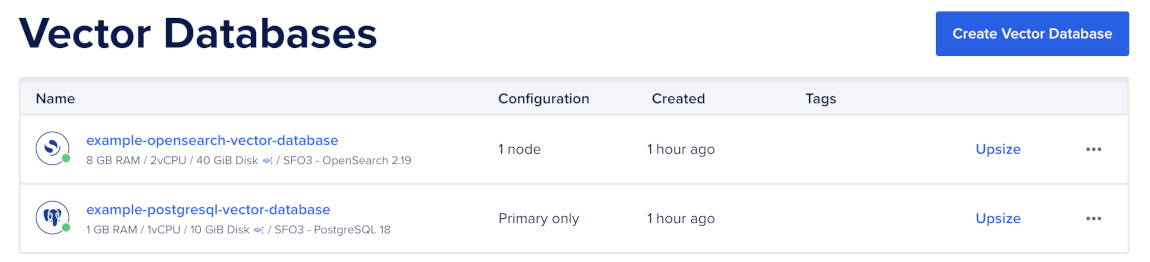
To create a k-NN index, first go to the Vector Databases page and select the cluster you want to use.
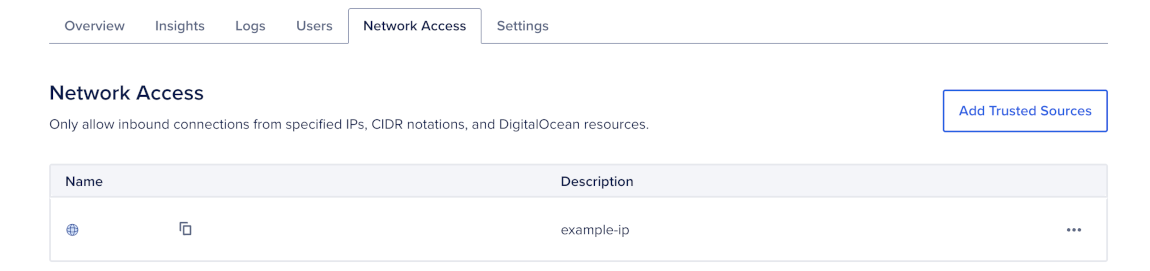
Then, go to the Network Access tab, find the trusted source you want to connect to, and then open a terminal session.
Create an Approximate k-NN Index
To create an approximate k-NN index, send a PUT request to your cluster with the index settings and mappings:
curl -X PUT "$OS/documents" \
  -H "Content-Type: application/json" \
  -d '{
    "settings": {
      "index": {
        "knn": true,
        "knn.algo_param.ef_search": 200,
        "number_of_shards": 2,
        "number_of_replicas": 1,
        "refresh_interval": "30s"
      }
    },
    "mappings": {
      "properties": {
        "title": { "type": "text" },
        "body": { "type": "text" },
        "source": { "type": "keyword" },
        "created_at": { "type": "date" },
        "embedding": {
          "type": "knn_vector",
          "dimension": 1024,
          "method": {
            "name": "hnsw",
            "engine": "faiss",
            "space_type": "cosinesimil",
            "parameters": {
              "m": 24,
              "ef_construction": 256
            }
          }
        }
      }
    }
  }'
This creates an index named documents for a semantic search workload with 1024-dimensional vectors, cosine similarity, and HNSW settings tuned for higher recall.
If you need to change the engine, dimension, or space_type later, create a new index and reindex your data.
After you create your k-NN index, index vectors.
Create an Exact k-NN Index
For small datasets, exact k-NN may be simpler and can provide exact recall. Use exact k-NN if you have fewer than about 10,000 vectors or if filters usually reduce the candidate set to a small number of vectors.
To create an exact k-NN index, omit the method block from the vector field:
curl -X PUT "$OS/documents-exact" \
  -H "Content-Type: application/json" \
  -d '{
    "settings": {
      "index": {
        "knn": true,
        "number_of_shards": 1,
        "number_of_replicas": 1,
        "refresh_interval": "30s"
      }
    },
    "mappings": {
      "properties": {
        "title": { "type": "text" },
        "body": { "type": "text" },
        "source": { "type": "keyword" },
        "created_at": { "type": "date" },
        "embedding": {
          "type": "knn_vector",
          "dimension": 1024
        }
      }
    }
  }'
You can query exact k-NN fields with knn_score. For more information, see Query Vectors Using Vector Search.
If you need to change the engine, dimension, or space_type later, create a new index and reindex your data.
After you create your k-NN index, index vectors.
Change an Existing k-NN Mapping
Some mapping changes are allowed after you create an index, but others require a new index. You can add a new knn_vector field to an existing index, but you can’t change the engine, dimension, or space_type of an existing knn_vector field.
Add a New Vector Field
If you need to store another type of embedding in the same index, add a new knn_vector field with PUT <index>/_mapping.
For example, if your index already has an embedding field for full document embeddings, you can add a summary_embedding field for summary embeddings:
curl -X PUT "$OS/documents/_mapping" \
  -H "Content-Type: application/json" \
  -d '{
    "properties": {
      "summary_embedding": {
        "type": "knn_vector",
        "dimension": 1024,
        "method": {
          "name": "hnsw",
          "engine": "faiss",
          "space_type": "cosinesimil",
          "parameters": {
            "m": 24,
            "ef_construction": 256
          }
        }
      }
    }
  }'
Change an Existing Vector Field
To change existing vector fields, create a new index, and then reindex your data:
curl -X POST "$OS/_reindex" \
  -H "Content-Type: application/json" \
  -d '{
    "source": { "index": "documents-v1" },
    "dest": { "index": "documents-v2" }
  }'
Changing embedding models also requires you to recompute embeddings and reindex the data. To reduce downtime, create the new index, backfill it, dual-write new documents, and switch traffic to the new index after queries are stable.