Avoid setting refresh=True during production ingestion. Forced refreshes make newly indexed documents searchable immediately, but they can add significant overhead for vector indexes. For production ingestion, rely on the index’s refresh_interval setting.
How to Index Vectors
Last verified 13 Jul 2026
DigitalOcean Managed OpenSearch for vector search uses the same managed OpenSearch engine available under Managed Databases. It bundles the k-NN, ML Commons, and Neural Search plugins for vector similarity search, hybrid vector and keyword search, and remote embedding models.
OpenSearch stores vector embeddings in knn_vector fields. After you create a k-NN index, you can index documents with the same REST APIs you use for standard OpenSearch documents. Make sure you have set your environment variables and verified the connection.
Most applications generate embeddings in application code using providers such as DigitalOcean Serverless Inference, OpenAI, Cohere, Voyage, or sentence-transformers, and then send the resulting float arrays to OpenSearch. For a server-side alternative, see Register a Remote Embedding Model.
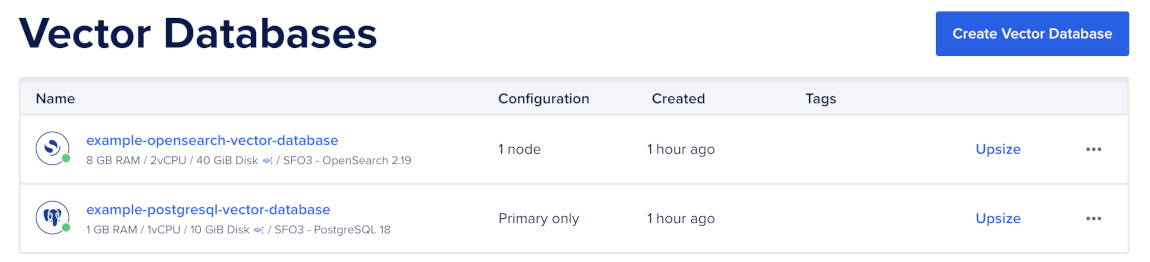
To start indexing vectors, first go to the Vector Databases page and select the cluster you want to use.
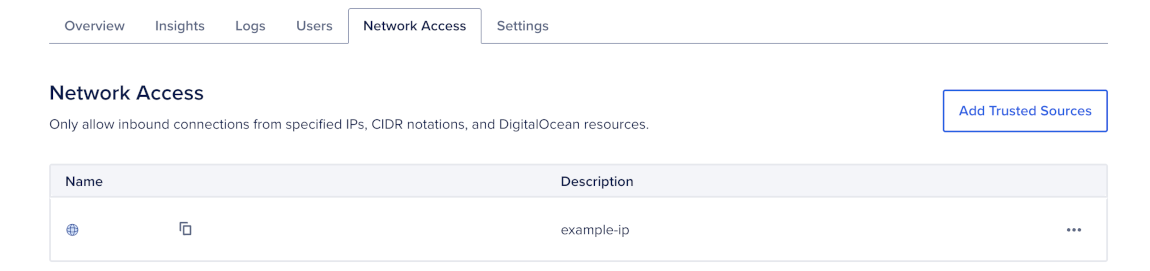
Then, go to the Network Access tab, find the trusted source you want to connect to, and then open a terminal session.
Index a Single Vector
Use single-document indexing when you want to add or update one document at a time.
To index a single document, provide a document ID, the document fields you want to store, and an embedding array that matches the dimension of the knn_vector field in your index.
For example, the following request indexes one document with the ID doc-1 into the documents index:
curl -X POST "$OS/documents/_doc/doc-1" \
  -H "Content-Type: application/json" \
  -d '{
    "title": "Introduction to OpenSearch vector search",
    "body": "OpenSearch stores vector embeddings in knn_vector fields.",
    "source": "blog",
    "embedding": [0.0123, -0.0456, 0.0789, "..."]
  }'
The embedding array must match the dimension you configured in the index mapping. For example, if the embedding field has "dimension": 1024, each indexed document must provide a 1024-dimensional vector.
Use Python when your application generates embeddings before indexing documents.
To index a single document, provide the target index, a document ID, the document fields you want to store, and an embedding value generated by your embedding function:
import os
from opensearchpy import OpenSearch

client = OpenSearch(
    hosts=[{
        "host": os.environ["OPENSEARCH_HOST"],
        "port": int(os.environ.get("OPENSEARCH_PORT", 25060)),
    }],
    http_auth=(os.environ["OPENSEARCH_USER"], os.environ["OPENSEARCH_PASSWORD"]),
    use_ssl=True,
    verify_certs=True,
)

client.index(
    index="documents",
    id="doc-1",
    body={
        "title": "Introduction to OpenSearch vector search",
        "body": "OpenSearch stores vector embeddings in knn_vector fields.",
        "source": "blog",
        "embedding": embed_one("Introduction to OpenSearch vector search"),
    },
)
In this example, embed_one() represents your application’s embedding function. Replace it with the function or API call you use to generate embeddings. The generated embedding must match the dimension of the knn_vector field in your index.
The embedding array must match the dimension you configured in the index mapping. For example, if the embedding field has "dimension": 1024, each indexed document must provide a 1024-dimensional vector.
Bulk Index Vectors
Use the _bulk API when you need to index more than a few documents. Bulk indexing is faster than sending one request per document because OpenSearch can process many indexing operations in one request.
For example, the following examples bulk index documents into an index named documents with a 1024-dimensional embedding field:
The _bulk API accepts newline-delimited JSON (NDJSON). Each document needs two lines:
- An action line that tells OpenSearch which index and document ID to use.
- A source line that contains the document fields and embedding values.
First, create a documents.ndjson file with the documents you want to index:
{ "index": { "_index": "documents", "_id": "doc-1" } }
{ "title": "Introduction to OpenSearch vector search", "body": "OpenSearch stores vector embeddings in knn_vector fields.", "source": "blog", "embedding": [0.0123, -0.0456, 0.0789, "..."] }
{ "index": { "_index": "documents", "_id": "doc-2" } }
{ "title": "Hybrid search basics", "body": "Hybrid search combines keyword and vector search.", "source": "docs", "embedding": [0.0211, -0.0322, 0.0654, "..."] }
Make sure the file ends with a newline. The _bulk API requires a final newline after the last line.
Then, send the documents.ndjson file to the _bulk API:
curl -X POST "$OS/_bulk" \
  -H "Content-Type: application/x-ndjson" \
--data-binary @documents.ndjsonThis example assumes you already initialized an OpenSearch client named client.
Use the Python clients helpers.bulk() function for larger ingestion jobs. It batches requests, streams documents from a generator, and can retry transient failures.
First, create a docs list with one object for each document you want to index. Each object should include the document metadata and embedding values like this:
docs = [
    {
        "id": "doc-1",
        "title": "Introduction to OpenSearch vector search",
        "body": "OpenSearch stores vector embeddings in knn_vector fields.",
        "source": "blog",
        "embedding": [0.0123, -0.0456, 0.0789, "..."],
    },
    {
        "id": "doc-2",
        "title": "Hybrid search basics",
        "body": "Hybrid search combines keyword and vector search.",
        "source": "docs",
        "embedding": [0.0211, -0.0322, 0.0654, "..."],
    },
]
Then, bulk index documents like this:
from opensearchpy import helpers

def gen_actions(docs):
    for doc in docs:
        yield {
            "_op_type": "index",
            "_index": "documents",
            "_id": doc["id"],
            "_source": {
                "title": doc["title"],
                "body": doc["body"],
                "source": doc["source"],
                "embedding": doc["embedding"],
            },
        }

helpers.bulk(
    client,
    gen_actions(docs),
    chunk_size=500,
    request_timeout=60,
)

client.indices.refresh(index="documents")
For large initial loads, temporarily set refresh_interval to -1 and number_of_replicas to 0 before ingestion, then restore both settings after ingestion finishes. This reduces indexing overhead while loading large batches.
After you index vectors, query vectors using vector search.