How to Create Checks
Last verified 3 Sep 2026
DigitalOcean Uptime is a monitoring service that checks the health of any URL or IP address. Use Uptime to monitor the latency, uptime, and SSL certificates of any website or host, and receive email or Slack alerts at thresholds you choose.
-
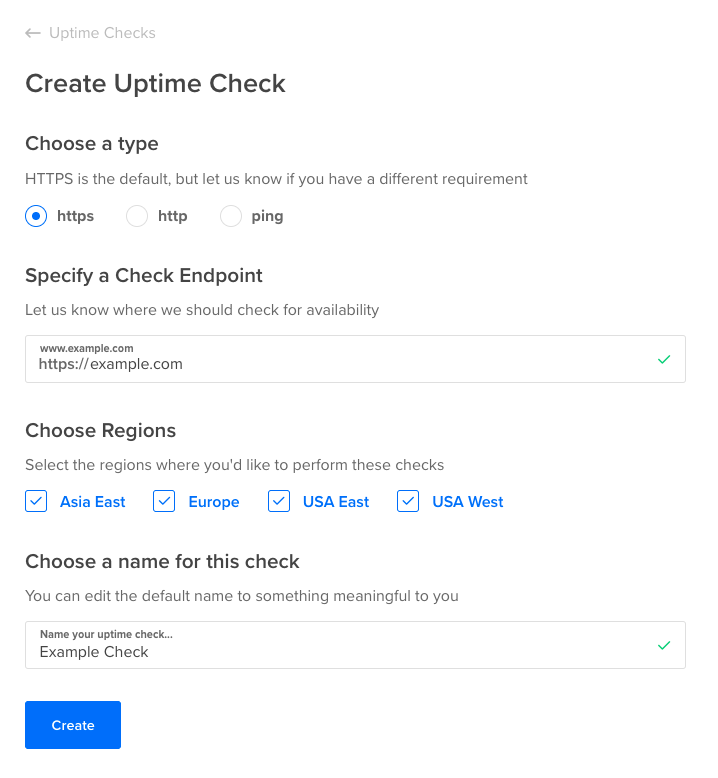
To create your first Uptime Check, click the Create a new Uptime Check button on the Uptime landing page. If you’ve already created a check, on the top right, click Create Uptime Check. This takes you to the Create Uptime Check page.
-
Choose the type of check to perform. The default is HTTPS. The options are:
- HTTPS: perform checks over HTTPS, including certificate expiry monitoring. Any HTTP response code outside of the 200-299 “success” range counts as an outage.
- HTTP: perform checks over plain HTTP. Any HTTP response code outside of the 200-299 “success” range counts as an outage.
- PING: perform an ICMP ping check, useful for hosts that aren’t running a web server.
-
Specify the check endpoint. This is typically an HTTPS or HTTP URL. For PING checks, it is a hostname (example.com) or IP address (203.0.113.4).
-
Choose the regions you’d like to perform the check from. By default, all regions are selected. If you have no customers or users in a particular region, you can deselect that region to reduce the possibility of alert fatigue from unimportant events.
The following regions are available:
- Asia East
- Europe
- USA East
- USA West
You must select one or more regions.
-
Enter a name for the check.
-
Press the Create Uptime Check button. Your Uptime check is created and its status page loads, pending data from the first checks.
As results start coming in, the latency graph populates with data. Refresh the page to get up-to-date check status information.