How to Create a Vector Index
Last verified 13 Jul 2026
DigitalOcean Managed PostgreSQL for vector search uses the same managed PostgreSQL engine available under Managed Databases, with the pgvector and pgvectorscale extensions for storing and querying vector embeddings alongside relational data.
A vector index is a PostgreSQL index on a vector column. PostgreSQL uses the pgvector extension to build indexes over vector embeddings so similarity queries can return nearest-neighbor results more quickly.
Before you create a vector index, create a PostgreSQL vector database cluster and configure its connection details.
You also need a table with a vector column that matches the number of dimensions your embedding model uses. Common values include 384 for MiniLM, 768 for BERT-family models, 1024 for bge-large and gte-large, and 1536 for OpenAI text-embedding-3-small.
Create a Vector Index
Create a vector index by connecting to your PostgreSQL cluster from a trusted source. Before you create the index, make sure you have enabled the vector extension and created a table with a vector column.
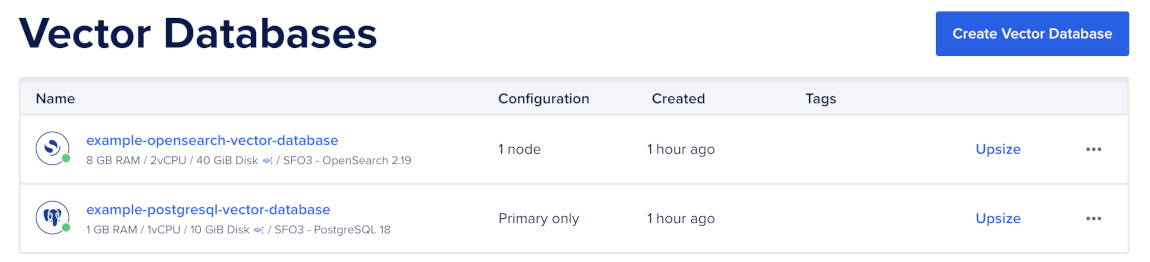
To create a vector index, first go to the Vector Databases page and select the cluster you want to use.
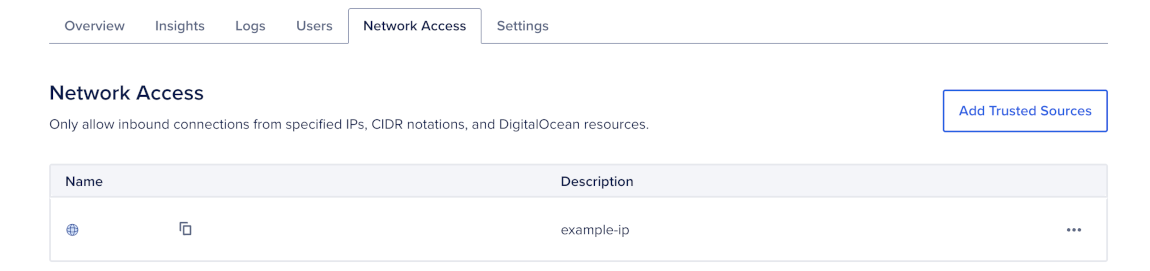
Then, go to the Network Access tab, find the trusted source you want to connect to, and then open a terminal session.
Create an HNSW Index
HNSW is the best default index type for most PostgreSQL vector search workloads. It provides high recall and fast queries, but uses more memory and takes longer to build than IVFFlat.
To create an HNSW index, run CREATE INDEX on the vector column:
CREATE INDEX documents_embedding_hnsw
    ON documents
    USING hnsw (embedding vector_cosine_ops)
    WITH (m = 16, ef_construction = 64);
This creates an HNSW index named documents_embedding_hnsw on the embedding column using cosine distance.
Use the operator class that matches your distance operator:
- Use
<=>withvector_cosine_opsfor cosine distance. - Use
<#>withvector_ip_opsfor inner product distance. - Use
<->withvector_l2_opsfor L2 distance.
The operator class must match the operator in your ORDER BY clause. For example, use vector_cosine_ops with ORDER BY embedding <=> $1.
After you create the index, query vectors.
Create an IVFFlat Index
Use IVFFlat when you need faster index builds or lower memory usage and can accept lower recall.
For IVFFlat, load data into the table before creating the index. IVFFlat uses the data present at build time to choose list centroids.
To create an IVFFlat index, run CREATE INDEX with the ivfflat index type:
CREATE INDEX documents_embedding_ivfflat
    ON documents
    USING ivfflat (embedding vector_cosine_ops)
    WITH (lists = 100);
This creates an IVFFlat index named documents_embedding_ivfflat on the embedding column using cosine distance and 100 lists.
Use the same operator-class matching rules as HNSW. For example, use vector_cosine_ops with ORDER BY embedding <=> $1.
After you create the index, query vectors.
Create a Partial Vector Index
Use a partial index when a specific tenant, category, or segment receives heavy search traffic.
To create a partial vector index, add a WHERE clause to the index definition:
CREATE INDEX documents_tenant_hot_hnsw
    ON documents
    USING hnsw (embedding vector_cosine_ops)
    WHERE tenant_id = '11111111-1111-1111-1111-111111111111';
Partial indexes are smaller and faster because PostgreSQL only maintains the index for rows that match the predicate.
Queries must include a matching filter before PostgreSQL can use the partial index. For example:
SELECT id, content
FROM documents
WHERE tenant_id = '11111111-1111-1111-1111-111111111111'
ORDER BY embedding <=> $1
LIMIT 10;
Verify Vector Index Usage
Use EXPLAIN (ANALYZE, BUFFERS) to confirm PostgreSQL uses the vector index:
EXPLAIN (ANALYZE, BUFFERS)
SELECT id, content
FROM documents
ORDER BY embedding <=> $1
LIMIT 10;
If the plan shows a sequential scan, check that:
- The query uses
ORDER BY embedding <operator> $1. - The operator matches the index operator class.
- The query includes a
LIMIT. - The table has enough rows for PostgreSQL to prefer the index.
- You have run
ANALYZEafter large inserts.
For partial indexes, also check that the query includes the same predicate used in the index definition.
Change or Rebuild a Vector Index
Some vector index changes require a new index. You can create additional vector indexes on the same column, but you can’t change an existing index from HNSW to IVFFlat or change its operator class in place.
Add Another Vector Index
If you need to support another distance metric, create a new index with the matching operator class.
For example, if your existing index uses cosine distance but you also need L2 distance, create another index:
CREATE INDEX documents_embedding_l2_hnsw
    ON documents
    USING hnsw (embedding vector_l2_ops)
    WITH (m = 16, ef_construction = 64);
Use the matching distance operator when querying this index:
SELECT id, content
FROM documents
ORDER BY embedding <-> $1
LIMIT 10;
Rebuild a Vector Index
After large inserts, run ANALYZE so PostgreSQL has current table statistics:
ANALYZE documents;Rebuild the index if you change embedding models, change vector dimensions, or notice degraded recall after major data distribution changes:
REINDEX INDEX documents_embedding_hnsw;Changing embedding models also requires you to recompute embeddings before rebuilding or recreating indexes.
Vector indexes can use significant memory. If searches become slow because the index no longer fits comfortably in memory, resize the cluster or use a lower-dimensional embedding model.